Cedreo: The Best SketchUp Alternative for Contractors and Home Builders
If you build or remodel homes, the best SketchUp alternative is Cedreo. SketchUp is a genuinely good general-purpose 3D modeling platform, used by woodworkers, set designers and product designers. But that range is exactly what makes it frustrating for residential work: you draw a house line by line, buy extensions to generate a roof or a decent render, then wrestle LayOut to get 2D drawings out the other end.
Cedreo is cloud-based home design software built only for contractors, home builders and remodelers. You draw a 2D floor plan, and the platform builds the 3D model, generates the roof and helps you produce client-ready presentation documents in as little as 2 hours.
This page compares the two head to head: features and pricing, the learning curve, 3D modeling and rendering, 2D documentation, and what real users say. Here’s what makes Cedreo the best SketchUp alternative.
Cedreo vs SketchUp: In Depth Comparison
Cedreo and SketchUp both produce 3D models, but they’re built for different jobs. Cedreo is the better choice for contractors, remodelers and home builders who need fast, professional conceptual designs and the documents that sell them. SketchUp is the better choice when you need an open-ended modeler that will draw anything, and you’re willing to wrestle with the toolset around it.
Here’s the in depth comparison, with prices, ratings and plan details checked in September 2026.
| Feature | Cedreo | SketchUp |
|---|---|---|
| Best for | Contractors, home builders and remodelers who need fast conceptual designs to sell projects | General 3D modeling: woodworkers, product designers, and firms willing to build a custom plugin stack |
| Starting price | $129/month per user billed monthly (Pro) | $99.99/month per user billed monthly (Pro), plus the price of any add-ons and extensions you may need. |
| Platform | 100% cloud-based, works in a browser on Mac or Windows | Desktop for Windows and Mac, plus web and iPad on some subscriptions; SketchUp Studio is Windows only |
| Learning curve | Low, and no CAD or architecture background required | Modeling simple objects comes fast, but residential documentation takes far longer |
| Time to a complete design | About 2 hours for a standard residential home (including the 3D model, renderings & project presentation) | Days to create a full 3D home model including renderings & a project presentation. |
| Walls, doors and windows | Real building objects with thickness, materials and self-cutting openings | Faces, edges and groups; the geometry carries no building data |
| Roof generation | Automatic, with gutters and overhangs applied around the house | Drawn manually, or generated by a paid extension |
| 3D rendering | Included in every paid subscription, processed in the cloud in about 5 minutes | V-Ray is bundled with SketchUp Studio only; Pro users add a paid render engine |
| 2D plans and documents | Floor plans, elevations, cross sections, site plans and electrical plans in the same workflow | LayOut, a separate app for construction documentation, with its own scene management |
| Hardware requirements | Any computer with an internet connection | A dedicated GPU for rendering, and large models can strain a typical laptop |
| Plugin dependency | Library and toolset included in the subscription, no plugin dependency | Extension Warehouse purchases to cover common home building tasks |
| File import | JPEG, PNG, PDF, DWG and DXF files, imported as a background to trace | Broad format support including skp, DWG and DXF, widest on Pro and above |
| Customer support | On-demand live chat, and email, as well as knowledge base and video library | Knowledge base, community forums and email support |
Cedreo is Top-Rated by Savvy Industry Experts
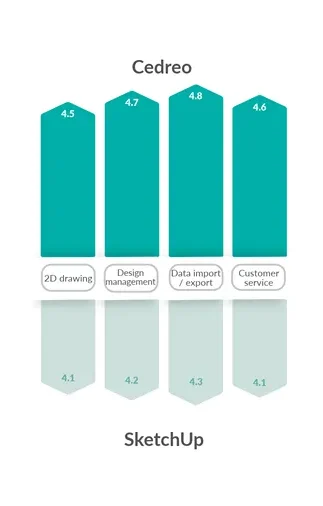
Ratings from verified users tell you what a feature list can’t: how the software behaves once it’s part of your week. On Capterra, Cedreo scores higher than SketchUp across the four categories that matter most to a contractor: 2D drawing, design management, data import and export, and customer service. For contractors like you, that means finishing plans faster, getting an answer from a real person the same day, and spending less time on the parts of the job that don’t sell anything.
Cedreo vs. Sketchup: The Customer Review Comparison
2D Plans and Presentation Documents: Cedreo Wins for Real-Time Syncing
Cedreo generates floor plans, elevations, cross sections, site plans and basic electrical plans in the same workflow as the 3D model, with no second application to manage. SketchUp splits that work across two applications: you model in SketchUp, set up scenes, then send them to LayOut, where the drawings actually live. That’s because SketchUp on its own is just a 3D modeler. SketchUp doesn’t do blueprints by itself, which is why LayOut exists, while Cedreo produces floor plans and blueprints without any add-ons.
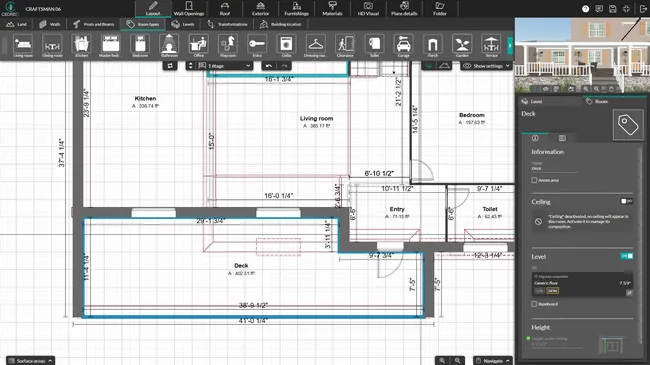
Unified workspace
- In Cedreo you design in 2D and 3D at once, so there’s no separate program and no scene management to maintain.
- SketchUp keeps the model and the drawings on separate platforms, which can cause lag once the drawings carry real detail.
Instant updates
- Change the design in Cedreo and the floor plans, elevations, cross sections, site plan and surface area tables regenerate from the model.
- In SketchUp the same change means updating the model, re-syncing your scenes and waiting for LayOut to catch up.
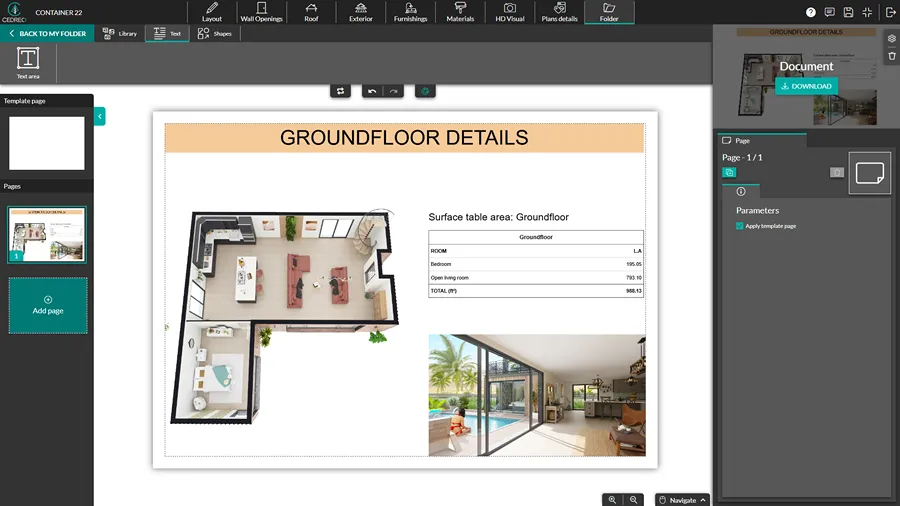
What you hand the client
- Cedreo helps you assemble the drawings and renderings into a presentation document, where you apply your own layout, scale and branding and export as a PDF.
- Getting from a SketchUp model to a branded client package means assembling it in LayOut or outsourcing it to save time.
Handoff to trades
- Cedreo drawings are built for concept design and client presentation, as well as export to DXF when a trade partner or engineer needs a CAD base for their own drawings.
- SketchUp exports in a variety of formats including DWG and DXF on Pro plans and above.
Ease of Use and Learning Curve: Cedreo Wins for Purpose-Built Simplicity
For residential work, Cedreo has the shorter learning curve, because the software already treats walls, doors, roofs and floors as building elements instead of geometry. SketchUp’s simplicity is real, and it’s the reason people pick up direct modeling in an afternoon. The catch is that the simplicity stops at the geometry engine, because SketchUp is a surface modeler at heart and what you draw are shapes, not buildings.
Here’s how that plays out across the parts of the work a contractor actually repeats.
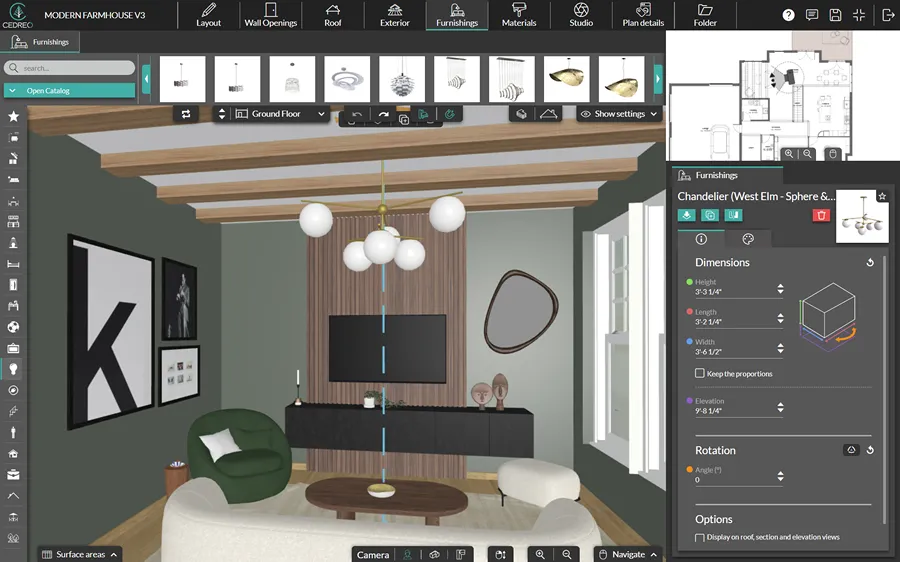
Parametric intelligence
- Cedreo walls carry thickness and materials, snap and align as you draw, and doors and windows cut their own openings, while room surface areas calculate automatically.
- SketchUp gives you faces, edges and groups, so a wall pushed up from a rectangle holds no building data, and cutting an opening leaves a hole with no lintel, sill or frame.
Revisions and client rounds
- If you move an exterior wall in Cedreo, the roof, the surface area tables and the 2D plans all update automatically, including the ones you’ve already placed in your presentation document.
- In SketchUp the same change means reconnecting the geometry at both ends and then updating the LayOut scenes, and how much work that is depends on your modeling method and extensions.
Roof generation
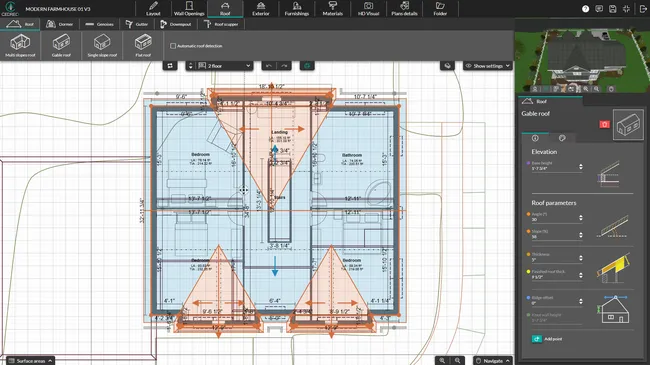
- Cedreo generates the roof automatically, valleys included, with dormers, skylights, gutters and overhangs ready to customize, which covers the hip and gable work a home builder repeats on most jobs.
- SketchUp roofs are drawn face by face or bought as a paid extension, and complex plan shapes are where that gets slow.
Plugin dependency
- Cedreo includes more than 2,400 customizable doors and windows, electrical symbols and the roof tools in the subscription, so there’s nothing to install or download before you draw a house, and the tools are intuitive enough to learn on your first project.
- SketchUp isn’t complex software on its own, but roof, framing and rendering tools often come from the Extension Warehouse, each with its own developer, price and update schedule.
3D Modeling and Rendering: Cedreo Wins for Built-In Photorealism
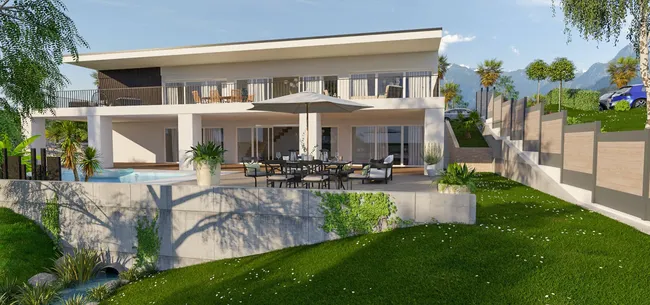
Both platforms handle 3D modeling, but only Cedreo includes photorealistic rendering in every paid subscription. In SketchUp, V-Ray is bundled with SketchUp Studio, and users on Go or Pro buy a render engine separately. Having the ability to quickly create a photorealistic rendering is important because the rendering shows the client the finishes, materials and textures they’re actually getting, which tends to cut down on indecision and on change orders later.
Included renderings
- Cedreo includes renderings in every paid plan, drawn from a monthly allowance of 40 renderings on Pro and 80 per user on Enterprise.
- SketchUp bundles V-Ray with Studio only, so Go and Pro users add Enscape Solo or V-Ray Solo as a second subscription.
Rendering speed and setup
- Cedreo renders in the cloud in about five minutes, two at a time in HD or Full HD. Auto Mode handles viewpoints, camera angles and lighting for you or use Manual Mode for full control.
- SketchUp plus a render engine means configuring the camera, shadow quality, reflection intensity, lighting and sun angles for each shot, on your own machine (takes a lot of time).

Hardware needs
- Cedreo runs on any modern computer with a browser. Because the rendering happens on Cedreo’s servers, you don’t need an expensive graphics card.
- Enscape, one common choice for a rendering extension, renders on dedicated video memory, 4GB at a minimum and realistically 8GB or more, so plenty of laptops will struggle and requirements vary by renderer, which makes compatibility worth checking carefully.
Design Library and Performance: Cedreo Wins for Ready-to-Use Assets
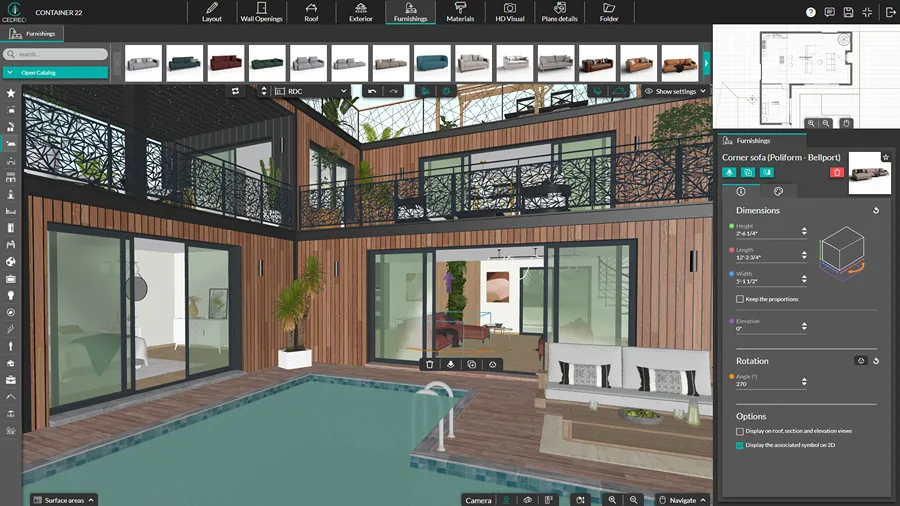
Cedreo’s 3D furnishing and material library is built into the platform, so a fully furnished house doesn’t slow your computer down.
Built-in 3D furnishing and material library
- Cedreo includes more than 10,000 furniture pieces and materials, built into the platform and ready to drop into a plan, so you’re not hunting down a sofa or a window and hoping it works.
- SketchUp’s 3D Warehouse objects are uploaded by anyone, with no guarantee an item has been optimized, so vetting each download is on you.
Impact on performance
- Because the project runs on Cedreo’s servers with optimized 3D objects, furnishing a whole house doesn’t leave you with a heavier file or a slower computer, and there’s nothing to back up or copy between the office machine and the laptop.
- A single 3D Warehouse component can run several megabytes. Inserting one into a complex model can take several minutes and bog down your machine.
When to Choose Cedreo as Your SketchUp Alternative
If you’re a 3D hobbyist, an industrial designer making custom furniture or an architect designing complex commercial structures, SketchUp’s open-ended modeler is a great fit. But if you build or remodel homes, generic tools cost you time and money. Here’s how to decide whether Cedreo is the right platform for your business.
You Want an All-in-One Solution
No more juggling SketchUp, LayOut and V-Ray. Cedreo covers the 3D model, the 2D plans, the photorealistic renderings and the presentation document in one platform. It’s all included in the subscription, with no extensions to buy.
You Need to Make Revisions Instantly
Move a wall in front of the client and the 2D plan, the 3D model and the roof update automatically. The floor plans, elevations and cross sections follow too, so there’s nothing to redraw by hand. You save time and avoid the mistakes that creep in when drawings fall out of sync.
You Need a Fast Concept-to-Presentation Workflow
Time is your most valuable asset. Cedreo takes you from a blank slate to a fully furnished 2D and 3D client presentation in as little as 2 hours. That makes it the clear winner for contractors and home builders who design in-house.
Examples of Home Designs You Can Create With Cedreo
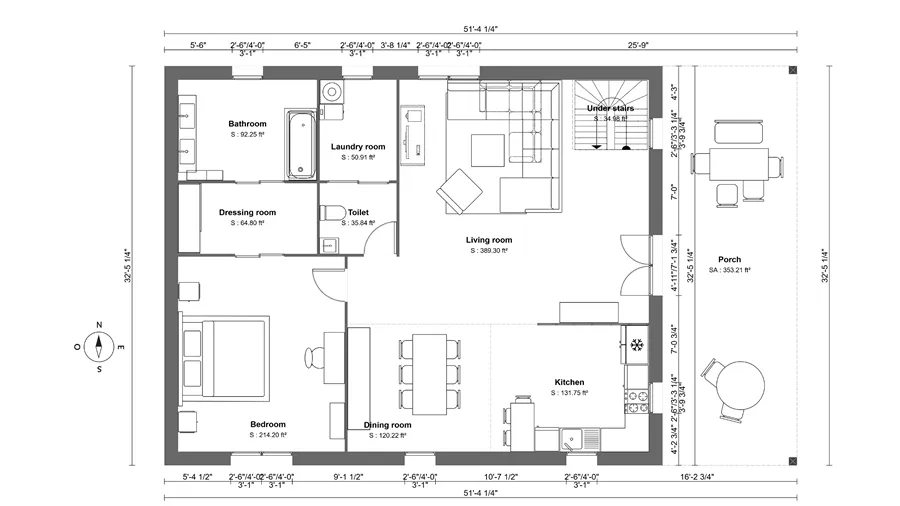
Here are the presentation outputs a Cedreo project produces, all from one concept design. Detailed 2D and 3D drawings, photorealistic visualization and complete presentation documents: everything you need to show a client exactly what they’re buying, so they can decide on layout and finishes from real drawings and images rather than guesswork.
Floor plan
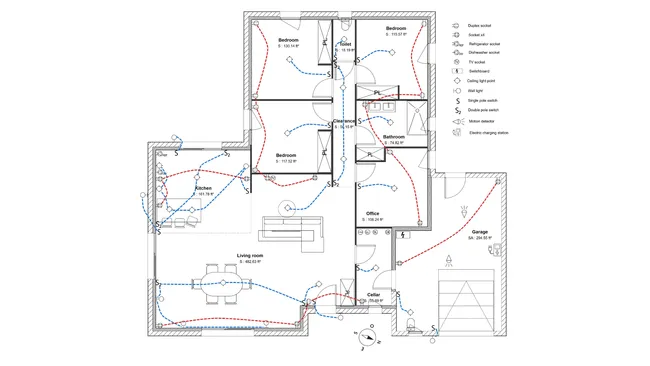
Electrical plan
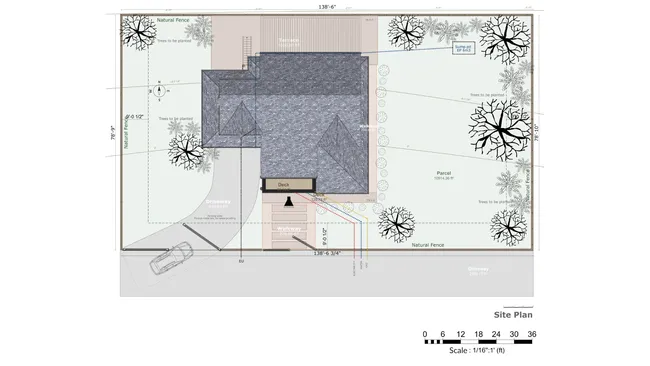
Site plan
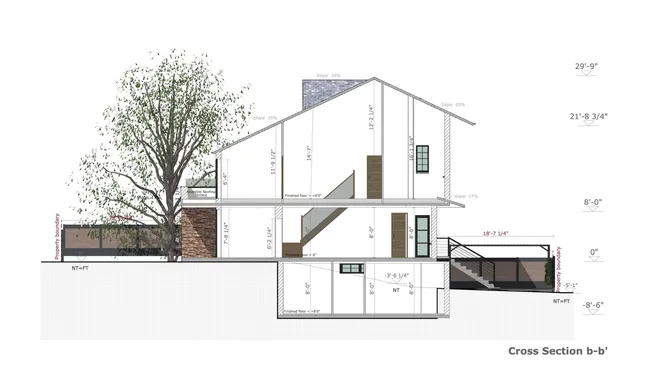
Cross section
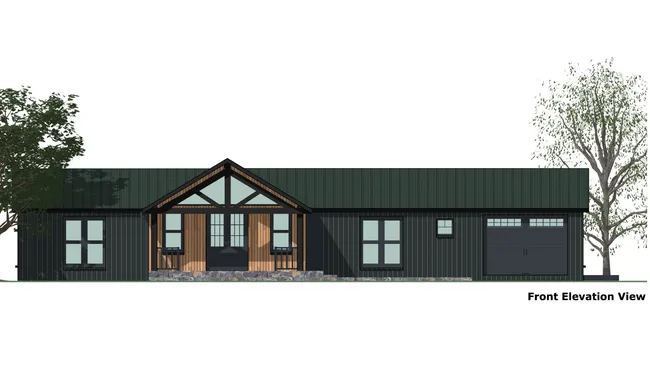
Elevation
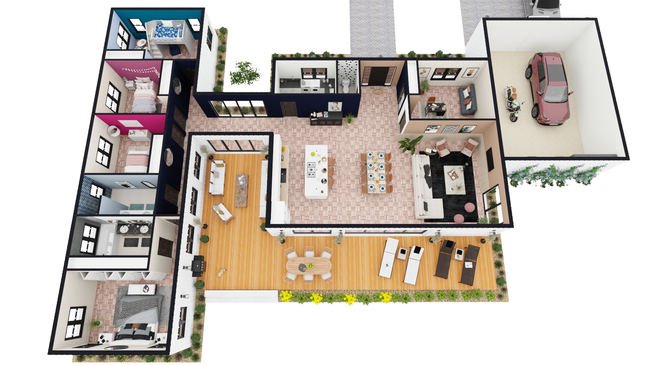
3D floor plans
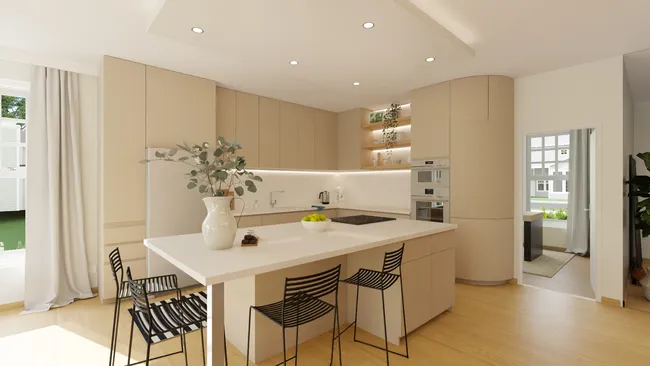
Interior 3D rendering

Exterior 3D rendering
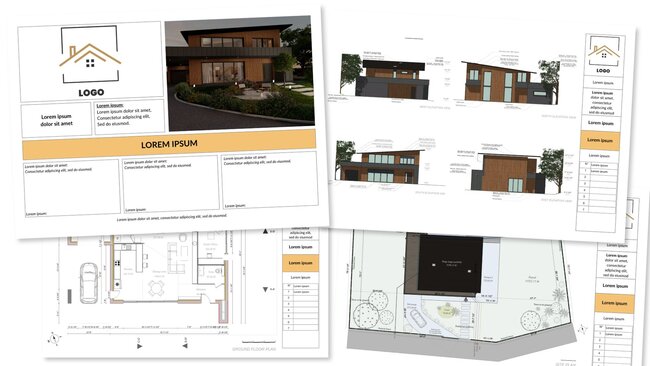
Presentation document
Customer Reviews Tell the Real Story
Feature tables only go so far. Here’s what contractors and designers say after using Cedreo on real projects.
“Best floorplan and design software for Contractors”
Excellent! I love the software. Easy to learn. I’ve spent hundreds of hours using it. I’ve used it from drawing the 4 walls of the home to figure out max square foot of a home I can put on a plat to fully drawing a 6000 sf custom home fully decorated with custom made details using the shapes tool.
“Intuitive Platform with Impressive Visuals”
I very much like Cedreo’s user-friendly platform, which I can intuitively learn and know what to do from the get-go. I also appreciate their visual rendering capabilities. Cedreo enables me to quickly draw plans for clients and send them a visual, making it easier for clients to visualize their purchase when I provide them with an estimate. I’ve stuck with Cedreo because of its ease of use and the visual effects. The initial setup of Cedreo was very easy.
SketchUp Alternative FAQs
What are some common SketchUp alternatives?
Cedreo is the popular choice for contractors, home builders and remodelers because it’s built specifically for residential design.
Blender (free and open source), Revit (BIM), Rhino (precise modeling, sold as a one time purchase) and Fusion 360 (parametric product design) suit other kinds of 3D modeling.
Is Cedreo easier to learn than SketchUp?
For home design work, yes: a standard residential project can be completed in Cedreo in about 2 hours, with no CAD or 3D modeling background, though like any software it depends on the complexity of the project.
SketchUp’s basic tools are quick to pick up too, but producing a full set of residential drawings from them means learning LayOut and usually an extension or two, which is where simple modeling turns into more complex software.
Can I import my SketchUp files into Cedreo?
You can export a floor plan from SketchUp Pro to PDF, DWG or DXF and import it in Cedreo to and trace over it.
Does Cedreo work on Mac like SketchUp?
Cedreo runs in a browser, so it works the same on Mac and Windows with no installation.
Which is better for contractors, Cedreo or software like SketchUp?
Cedreo is better for most contractors since it lets you create a full set of 2D and 3D house plans within the same platform, in just 2 hours without having to juggle multiple extensions like with SketchUp.
Can Cedreo replace SketchUp LayOut?
For client-facing plans, yes: Cedreo generates floor plans, elevations, cross sections, site and basic electrical plans through one intuitive workflow, and they update with the model instead of needing viewport sync.
Those plans combine with your renderings in a branded presentation document, so a polished client package comes out of the same app without a separate layout program.
Can I export drawings out of Cedreo?
Yes. Plans download to JPG, DXF and PDF, and complete presentation documents export as branded PDFs.
The DXF export is what you hand a trade partner or engineer who needs the plan in a CAD program.