What is the Difference Between a 2D and 3D Rendered Floor Plan?
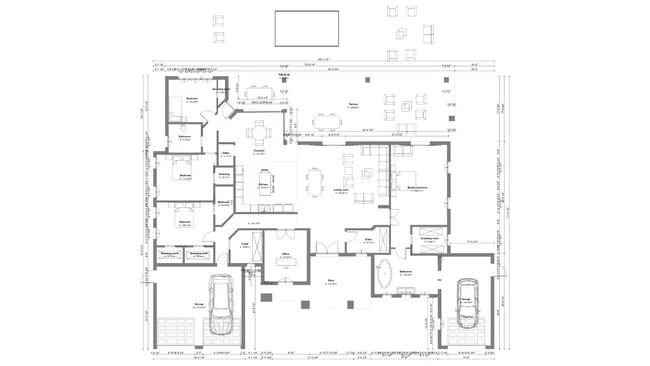
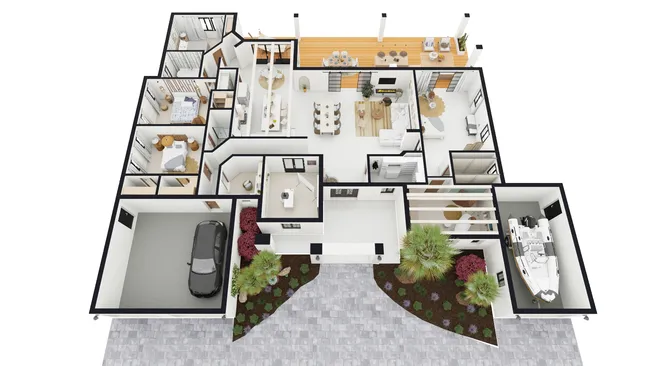
A 2D floor plan is a technical top-down drawing showing wall measurements, room dimensions, surface areas and door placements. A 3D rendered floor plan is an image that shows the same layout fully furnished with realistic materials and colors, so clients can visualize the finished space. You can create both in one tool like Cedreo.
- A 2D floor plan communicates technical construction details, while a 3D rendered floor plan helps clients visualize the finished space. A 2D plan is a top-down drawing that shows wall measurements, wall types and thicknesses, load-bearing walls, room surface areas, and the placement, direction, and dimensions of doors and windows.
- A 3D rendered floor plan is a photorealistic, three-dimensional view of the same layout but fully furnished, decorated, and shown with realistic materials, colors, and lighting. It helps clients understand how all design elements work together, see the space from multiple angles, and evaluate how furniture placement affects room flow and usability.
In practice, housing professionals use both types together: the 2D plan for technical accuracy and contractor communication, and the 3D rendered plan for client presentations and sales.
Cedreo creates both 2D and 3D floor plans within the same platform. You draw the house plan in 2D, and Cedreo automatically generates the 3D rendered floor plan with just a click.
Changes made in the 2D drawing automatically update the 3D view to keep both versions synchronized. That means any modification made in the 2D view such as moving a wall or resizing a room instantly updates the 3D version.
Then, after completing the design, you set the point of view and request a 3D rendered floor plan with just a click. In 5 minutes or less the rendered image is ready to send to clients or add to presentations.