3D Construction Design Software
Design residential and commercial construction projects in minutes, without a CAD background.
How Cedreo Fits into Your Construction Design Process
From idea to signed proposal, Cedreo gives you every tool you need. No CAD experience required.
Here’s how to use it as pre construction software to plan and present your designs.
Draft Your Construction Drawings
Start with an accurate floor plan so your key dimensions are locked in from the start.
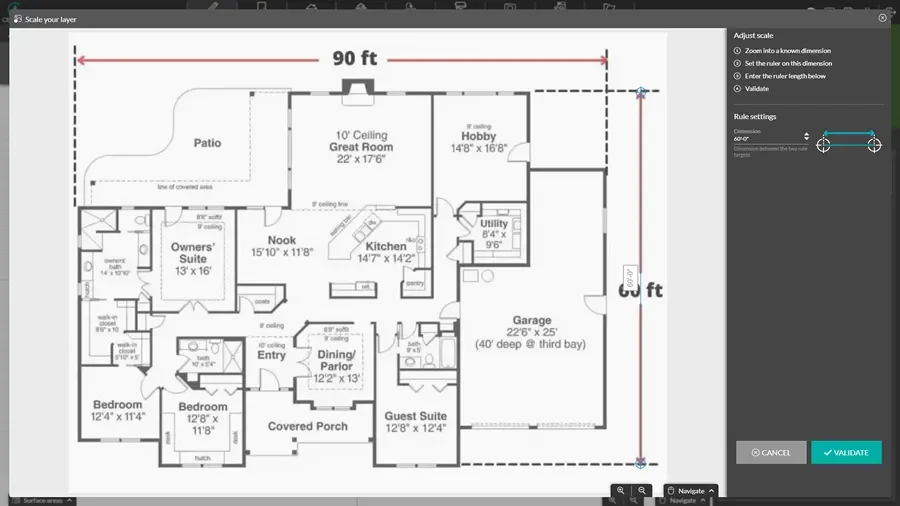
- Drop in a JPG, PNG, PDF, DWG, or DXF of an existing plan and trace your walls right over it.
- Lay out exterior and interior walls, then stretch or shrink the whole footprint when the design shifts.
- Add a basement or another story in a single click, with exterior walls carried up from the floor below.
- Pull doors and windows from the catalog, then label your rooms and add dimensions and symbols.
Model the Site and Terrain
Set the building on its real lot so clients see the construction project in context.
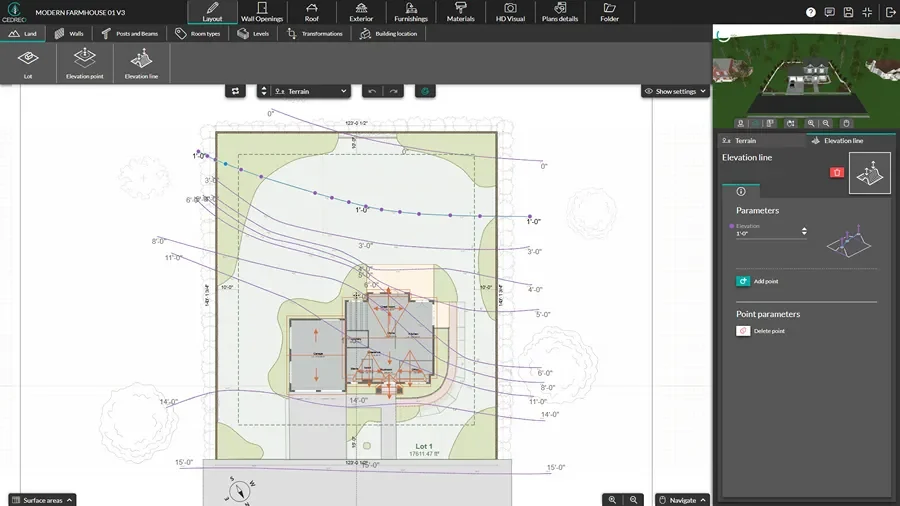
- Trace the lot boundaries and set your property setbacks so the building sits exactly where it belongs.
- Shape slopes and elevation changes that mirror the real grade of the site.
- Add retaining walls to manage grade changes and carve out a level building pad.
- Add parking, driveways, walkways, fencing, and landscaping for a complete site picture.
Present Your Plans & Win the Job
Bundle every drawing into one branded document that helps clients say yes the first time.
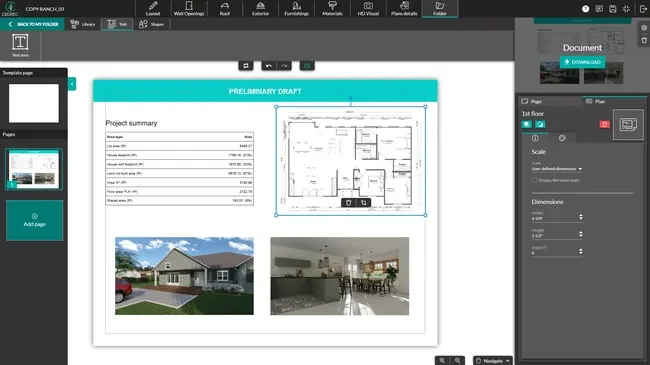
- Pull your floor plans, site plan, renderings, sections, elevations, and area tables into one document.
- Brand it with your logo and cover image, then add notes wherever a detail needs explaining.
- Send it as a polished PDF, ready to email or hand across the table.
2D & 3D Floor Plans for Construction Projects
Every construction project starts with the floor plan, and Cedreo gets you a clean, detailed one fast.
Nail it early and the drawings that follow fall right into place.
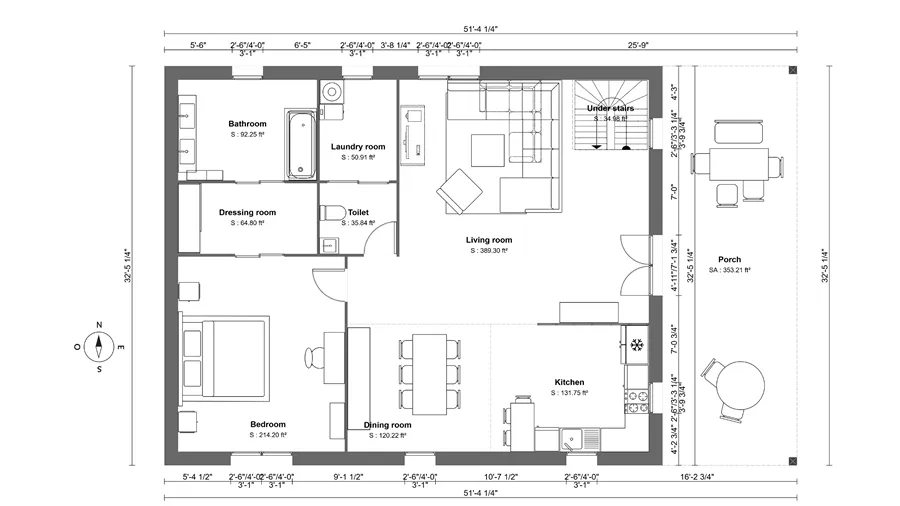
- Detailed 2D plans: See walls, dimensions, and surface areas, plus furniture, fixtures, appliance symbols and a compass for orientation.
- Top-down 3D plans: See the full layout in 3D with real materials, colors, and furnishings, or switch to a white background for apartments and interior-only jobs.
- Built-in electrical plans: Place outlets, switches, panels, and light fixtures right where they belong on the plan.
- Live square footage: Areas recalculate the instant a wall moves, broken out by room, level, and use.
Construction Drawings (Site Plans, Elevations, Sections)
Layouts only tell half the story.
These are the drawings that show how a build actually comes together, and Cedreo generates them straight from your plan.
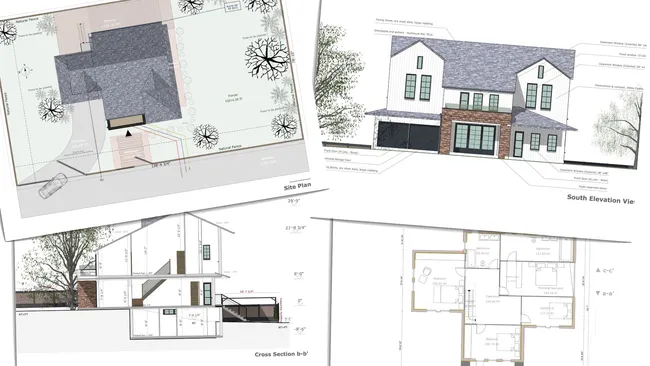
- Site plans with context: Set the footprint on its real lot, complete with setbacks, driveways, walkways, and the slope of the land.
- Cross-sections: Cut through the build to reveal framing depth, ceiling heights, stair runs, and roof pitch, with site grade shown alongside.
- One-click elevations: Generate front, rear, and side views in a click, finished with doors, windows, materials, and landscaping.
- On-drawing notes: Add callouts, custom dimensions, and annotations wherever a construction detail needs flagging.
Construction Proposals That Win More Projects
Hand a client a flat 2D plan and they scratch their head. Show them a photorealistic 3D rendering of the finished build and they get it instantly.
That clarity is what turns a maybe into a signed contract.
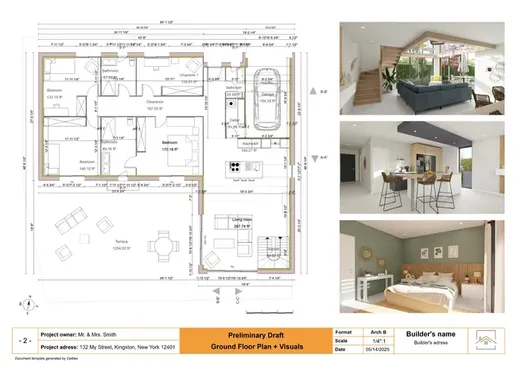
- Show the real finishes: Cabinet colors, flooring, siding, and roofing rendered in lifelike detail.
- Place it on their lot: Drop in a background photo so the home appears on the client’s actual property.
- Multiple options, side by side: Show two or three finish or layout versions as matching renderings so clients decide in one sitting.
- Reusable branded templates: Build the proposal once with your logo and standard sections, then duplicate it for the next job.
Key Features of Cedreo’s Construction Drawing Software
As design software for construction pros, Cedreo pairs advanced features with a user friendly interface simple enough to learn in an afternoon
This lets your whole team design without a steep learning curve.
Import DWG, DXF, PDF Construction Plans and Trace
Import any existing plan in JPG, PNG, PDF, DWG, or DXF format and trace your walls over it to get a precise floor plan with the exact same measurements.
Export Construction Drawings to Scale
Download any plan you draw as a PDF and print it to scale. You can also export files as DXF for use with other CAD programs.
Resize & Adapt Existing Construction Designs
Adapt any existing project to fit your new clients’ expectations. Move walls and partitions to resize rooms, or change the size of the whole project at once.
One-Click Roof for Any Construction Project
Choose the roof type for your design and add the entire roof in a single click. The roof appears automatically, and you can customize it from there.
Multi-Level Construction Planning
Create multi-level constructions with ease. With one click, add a basement or upper level with exterior walls duplicated from the ground floor.
Automatic Plan Updates
Every plan you create updates automatically as you change the drawing, so your dimensions and surface areas always match and your project data management stays organized.
Construction Designs Created With Cedreo
Cedreo is house construction design software for new builds, additions, and remodels alike.
From a quick 2D drawing to a full set of 3D models, here are real deliverables you can create across all kinds of construction projects and project types.
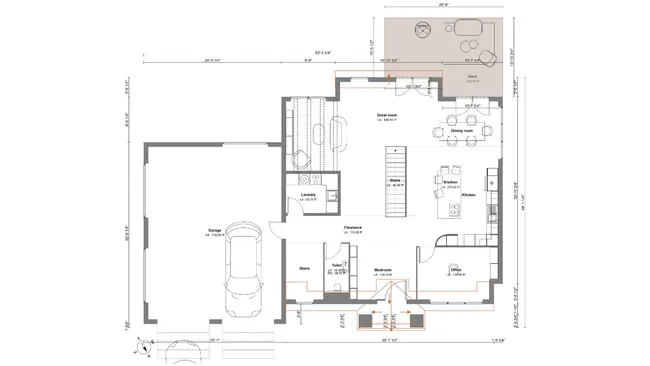
2D construction drawing
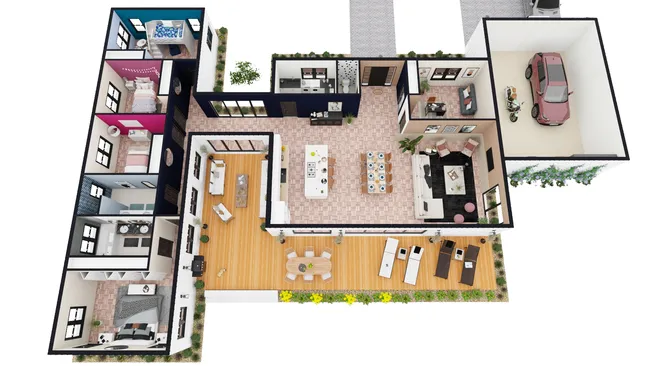
3D construction floor plan
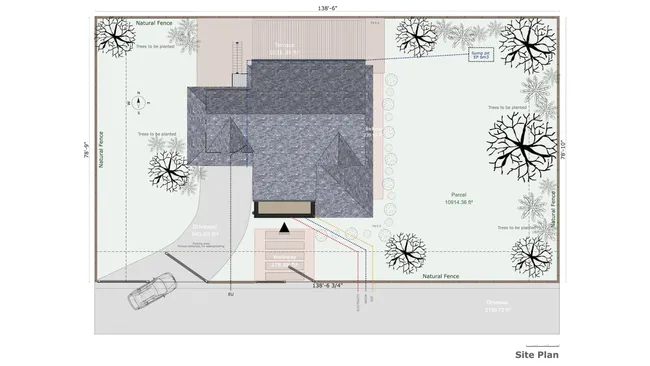
Site plan for new construction
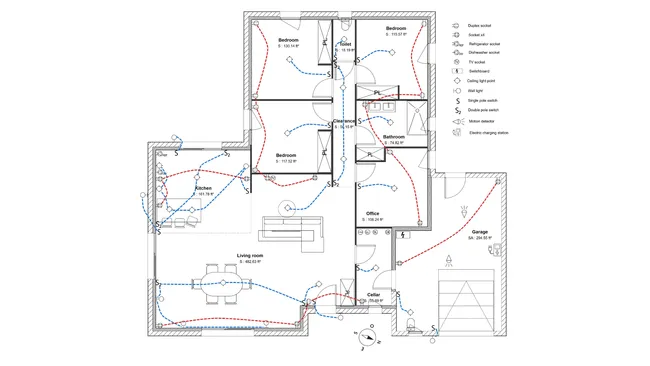
Electrical plan
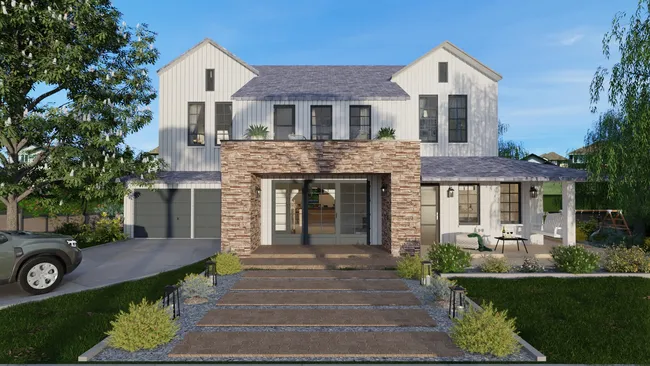
3D rendering
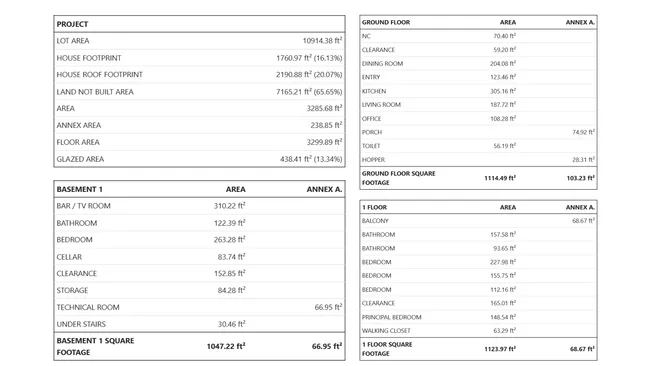
Surface area table
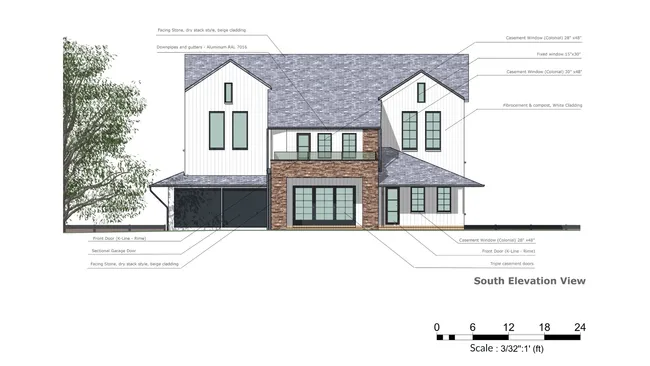
Elevation view
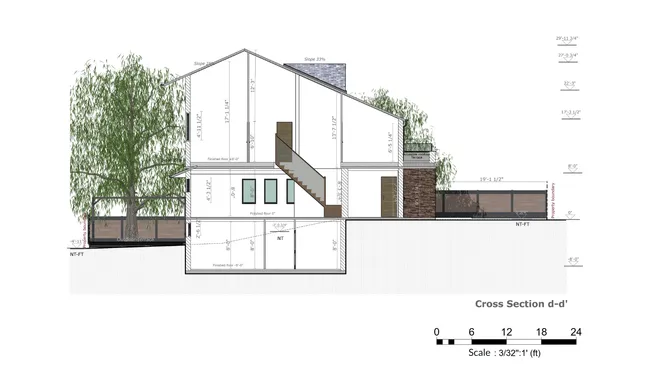
Cross section
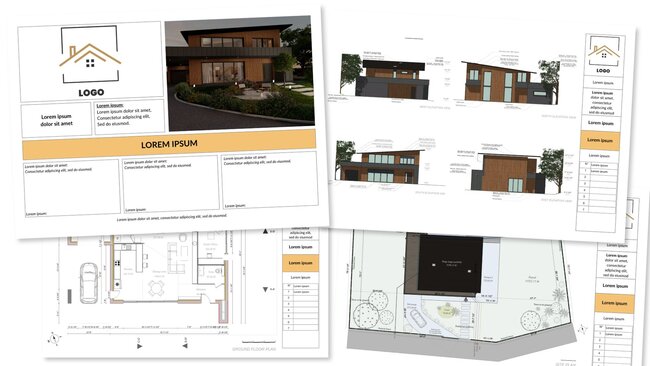
Branded construction proposal
It’s easy to use.
But you can always count on Cedreo support.
For an even faster start, access tutorials and help articles.
Get tips to do more, faster.
“I was really shocked to find how easy it is to use their software. No other 3D home design even compares to Cedreo. So happy we found it!”
Construction Design Programs FAQs
What is construction design software?
Construction design software is a digital tool that lets builders draft 2D and 3D plans, model the site, and present projects to clients without a CAD background.
Cedreo combines all of that in one platform so you can move from concept to signed contract faster.
What’s the best construction design software for residential contractors?
The best construction design software pairs floor plans, 3D models, and branded proposals without a steep learning curve.
Cedreo fits that exact design process and works as small business construction software, helping contractors and small contractors deliver projects faster.
What construction drawing software do home builders use?
Home builders use a mix of construction drawing software, from CAD tools to dedicated 3D programs.
Many include Cedreo in their workflow because it handles 2D and 3D floor plans, site plans, and photorealistic renderings in one user friendly software.
How is construction design software different from CAD?
Computer aided design (CAD) tools are powerful but built for detailed engineering and carry a steep learning curve.
Construction design software like Cedreo focuses on fast residential and commercial design, so you get plans and 3D models without the technical overhead of other software.
Can I use construction design software without a CAD background?
Yes. Cedreo is built for construction pros with no CAD or architecture training.
That means you and your project teams can produce detailed 3D designs without an extensive CAD or 3D design background.
What’s the best 3D construction design software for small builders?
The best 3D construction design software for small builders is affordable, easy to learn, and strong at client presentations.
Cedreo small business construction software offers a free version as well as affordable plans with tools that let contractors create 3D designs fast.
Is there construction design software for Mac?
Contractors often point to tools like SketchUp and Chief Architect, but more are turning to Cedreo.
Cedreo software lets you handle 2D floor plans, 3D rendering, and project proposals all in one place.
Can contractors use construction design programs for client presentations?
Yes, and it’s where these programs pay off.
Programs like Cedreo let you combine plans and photorealistic renderings into branded presentation documents that help clients picture the finished project and approve it sooner.
What construction design programs include 3D visualization?
Cedreo includes 2D design and 3D visualization in one platform, so you can turn creative ideas and design ideas into realistic 3D models.
As you draw in 2D, the program creates a 3D model where you can add textures and materials, and then get high-quality 3D renderings to present to clients.
How fast can I produce a full 3D construction design in Cedreo?
Most users can create a complete 3D construction design in two hours or less with Cedreo.
The intuitive interface and advanced tools save time and speed up project completion, even across complex project types.
Is Cedreo’s construction design software for Mac compatible?
Yes. Cedreo is fully browser-based, so it runs on any Mac without installation or CAD experience. From first sketch to signed proposal, you get every tool you need to draw plans and present 3D designs clients understand.