How Do You Present a Floor Plan to a Client?
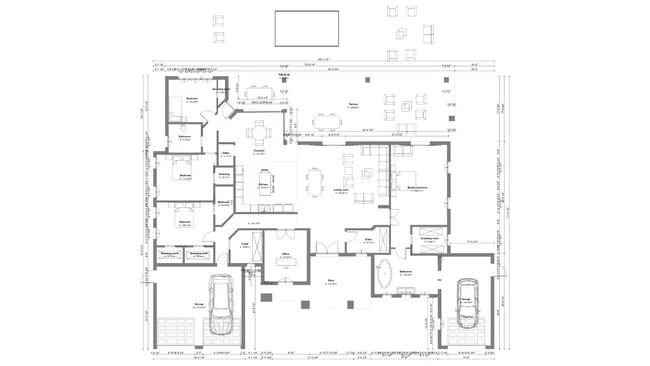
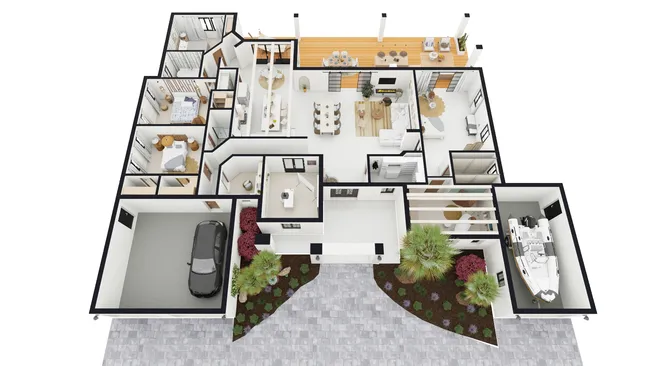
To present a floor plan to a client, combine a 2D plan and a 3D floor plan into a branded presentation document. Start with the 3D view for immediate understanding, then reference the 2D plan for measurements and surface areas. Tools like Cedreo generate both views and compile them into one document.
The 2D floor plan provides the technical foundation. It shows wall measurements, room dimensions, surface areas, and the placement and size of doors and windows. This view is necessary for discussing room sizes, adjacencies, and structural detail but most clients find 2D plans abstract and difficult to interpret on their own. It can also include the electrical plans with lines and symbols.
The 3D floor plan makes the project immediately understandable. It shows the same layout but fully furnished and decorated, with realistic colors, materials, and furniture placement visible from a bird’s-eye perspective. This view helps clients visualize room proportions, traffic flow, and how the design elements work together, and dramatically reduces misunderstandings between the professional and the client.
The most effective approach is to compile both views into a complete presentation document that also includes interior and exterior 3D renderings. This gives clients a comprehensive picture in a single deliverable: the overall layout (3D floor plan), the feel of individual rooms (interior renderings), the home’s curb appeal (exterior renderings, elevation views and site plans), and the technical details (2D floor plan, cross-sections, and electrical plan).
A well-structured presentation document looks professional, keeps the conversation focused, and gives the client something tangible to review after the meeting.