The tools, systems, and workflow habits that help general contractors go from chasing one job to running multiple remodeling or construction projects without the chaos.
Poor organization with the wrong tools are the most expensive thing in a contractor’s business.
Think about the hours spent redoing estimates because the scope wasn’t locked down.
Or the calls to clients who should have gotten a weekly update.
Or the drive across town to answer a question a photo and a quick message could have solved.
For general contractors trying to streamline remodeling projects, those small drains add up to lost days, lost revenue, and lost capacity to take on other projects.
This guide breaks down the tools and organization that help eliminate those bottlenecks, from the first client meeting to the final punch list.
Key Takeaways
- The biggest workflow gains come from fixing what happens before work begins: locking scope, pre-qualifying clients, and running design and estimates in parallel.
- Standardized communication (weekly updates, daily progress photos, structured handoffs) cuts reactive calls and frees time for running multiple jobs.
- Improving construction workflows doesn’t need expensive software. A focused stack of tools for design, project management, client communication, and documentation covers most needs.
- Cedreo helps contractors produce client-ready floor plans and 3D renderings in one session, streamlining the path from first meeting to signed contract.
Why trust us? Here at Cedreo, we’ve got 20+ years of experience working in the home design space. So we know what it takes for contractors and remodelers to create project designs that help streamline their business!
See How You Can Create Complete Projects with Cedreo
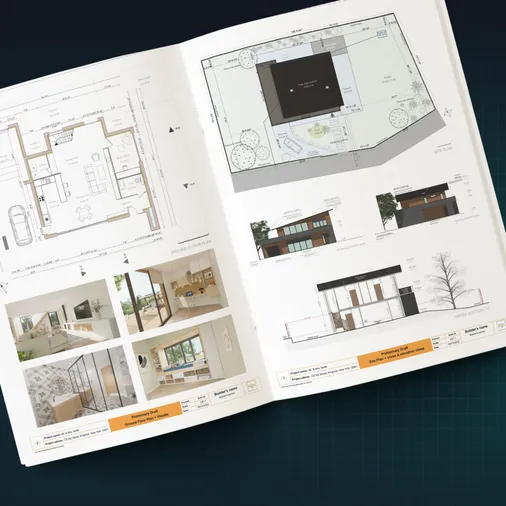
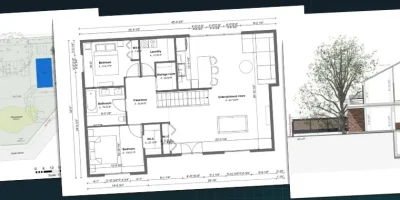
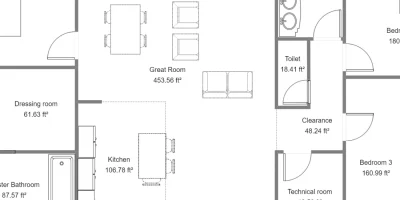
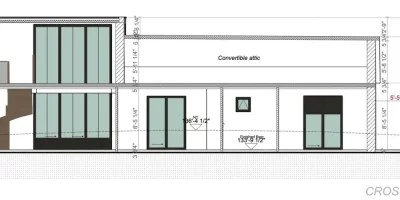
Plans – Get site plans, 2D floor plans, electrical plans, cross sections and elevation views — with all the technical details you need for a comprehensive project overview.
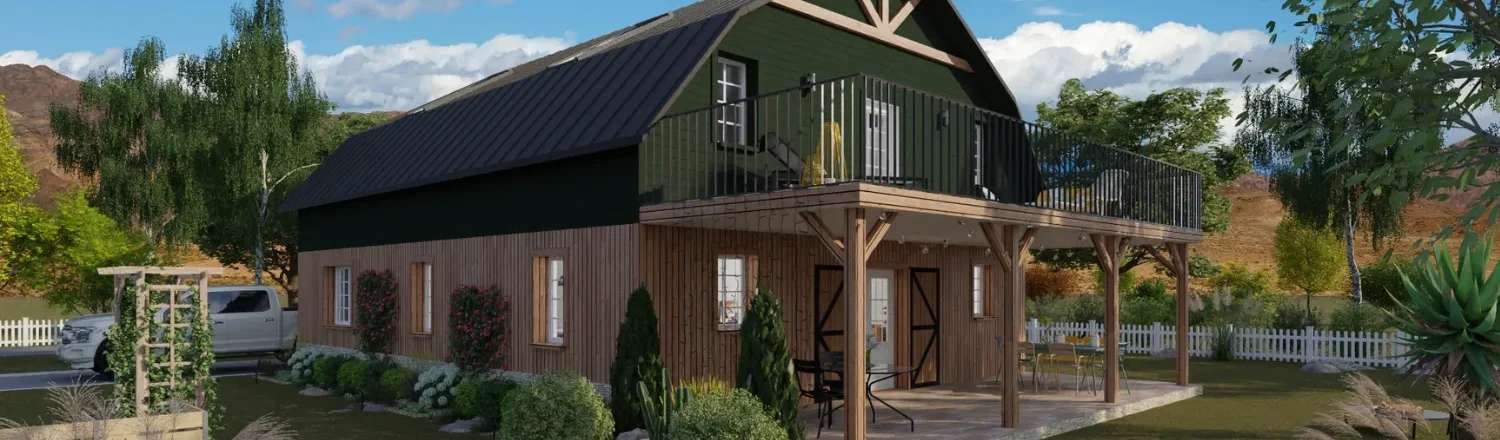
3D Visualizations – Use interior and exterior 3D renderings as well as 3D floor plans to help clients understand the finished project.
Documentation – Manage all your visual documents in one place, so it’s easier to present and sell your projects.
No credit card required, no commitment
Why the Most Organised Contractors Can Take on More Jobs Without Working More Hours

Contractors who consistently take on more projects aren’t necessarily grinding longer days.
When your construction workflow relies on you answering every question and chasing subs for updates, your capacity caps at your personal bandwidth.
That ceiling is usually two or three construction projects at once.
Contractors who break past it invest upfront in digital tools and organizational strategies that reduce decision-making bottlenecks.
They have tighter design approvals, clearer team handoffs, and a communication cadence that keeps everyone on the same page.
The rest of this article breaks down exactly what that process looks like, from the tools you need to the organizational habits that help you improve construction workflows and manage jobs efficiently.
The Tools and Organization Every Contractor Needs Before Taking on More Remodeling or Construction Projects
Before taking on more projects, the ones you already have need to run on systems, not memory.
Below are the four categories of tools and organizational strategies contracting companies need for a scalable construction workflow.
Design and Scope Tools
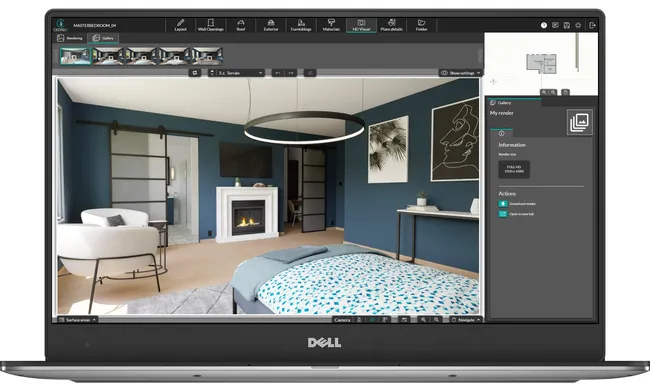
Design and scope tools give both sides a clear picture before work begins.
Scope gaps are the top source of costly mistakes on home renovation projects.
For example, when a client says “open concept kitchen” and pictures something different than you do, that shows up later as a change order or an argument.
Useful tools:
- Cedreo – 3D home design software built for housing pros, not architects. Draw 2D floor plans, furnish rooms from 10,000+ items, and generate photorealistic 3D renderings fast. Most contractors we work with can create a full set of 2D & 3D designs in 2 hours or less.
Organizational strategies:
- Scope document template – A standardized checklist that defines what is included (and what is not) before the contract is signed. Keeps both parties accountable and prevents scope creep later.
- Visual sign-off process – Require client approval on renderings or marked-up floor plans before work begins. This eliminates the “I didn’t expect that” conversations during construction.
- Professional project presentation – Compile your floor plans, renderings, and surface area tables into a single project presentation that includes all the details a client needs to say yes faster and with less back and forth.
Project Management Tools
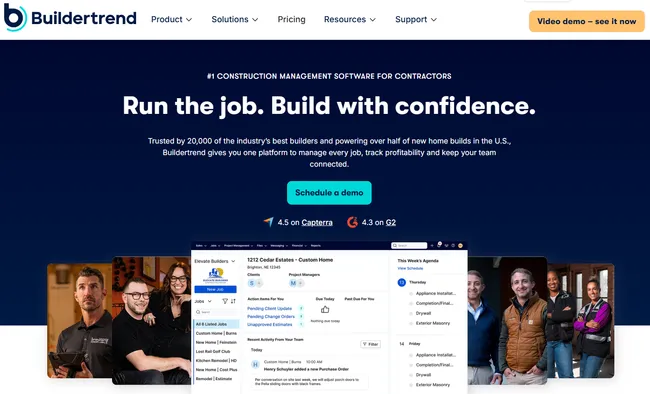
Project management tools are the backbone of improving workflows once a project is signed.
Without a central place to track schedules, budgets, and task status, team members end up with different versions of the truth.
That means double entry, wasted time, and outdated decisions.
In the construction industry, project timelines are tight and project delays cascade fast, so a single source of truth is non-negotiable.
Useful tools:
- Jobber – Lighter-weight scheduling, invoicing, and client management. Great for problem solving on the go with its mobile apps.
- Shared Google or Excel spreadsheet – Don’t underestimate the power of a simple shared spreadsheet. Task, owner, status, and due date columns beat sticky notes and group texts.
- Buildertrend – All-in-one platform for scheduling, budgeting, change orders, and client comms with subcontractors in the loop. Popular with residential construction companies running multiple jobs.
- CoConstruct – Built for custom home builders and remodelers. Strong on selections tracking and financials.
Organizational strategies:
- Weekly schedule review – 30 minutes each Monday to review project timelines, flag potential delays, and adjust resources.
- Budget check-ins at milestones – Compare actual costs to estimates at demo, rough-in, and finish. Catch overruns before they compound.
- Morning stand-up call – Five minutes with each crew lead. Confirms what’s being worked on and what’s stuck.
Client Communication Tools
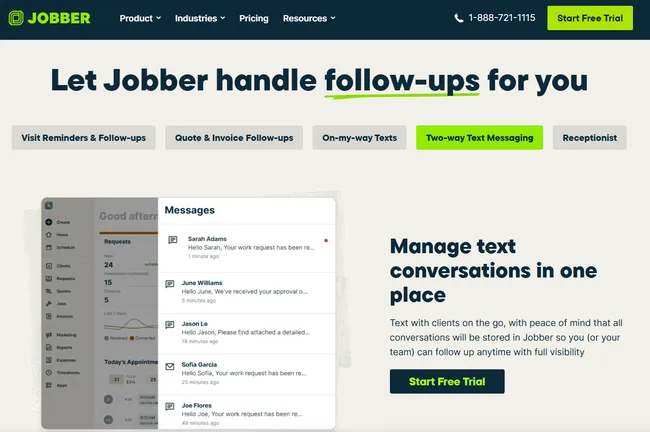
Communication gaps between contractors and clients create more project delays than material shortages.
When a client doesn’t know what’s happening, they call and worry and then micromanage.
A structured system prevents the chain reaction.
Useful tools:
- Jobber Client Communications – Keep all messages with clients in the same place instead of being scattered between half a dozen different messaging apps.
- Buildertrend Client Portal – Homeowners see schedules, photos, selections, and messages. Cuts inbound calls.
- Simple email templates – Pre-written weekly update templates that take five minutes to customize.
- Desktop messaging app – Your phone’s messaging app (iMessage, WhatsApp) on your laptop. Faster than thumbing updates.
- Video calls for site questions – A 60-second call beats ten back-and-forth texts with photos.
Organizational strategies:
- Weekly update cadence – Pick a day (Friday works well) and send every client a short update: what was completed, what’s next, decisions needed.
- Decision deadline policy – Clear deadlines for material and design selections, spelled out in the contract.
- Single point of contact rule – One person is the only contact for each client. Keeps information from scattering across trades.
Photo and Documentation Tools
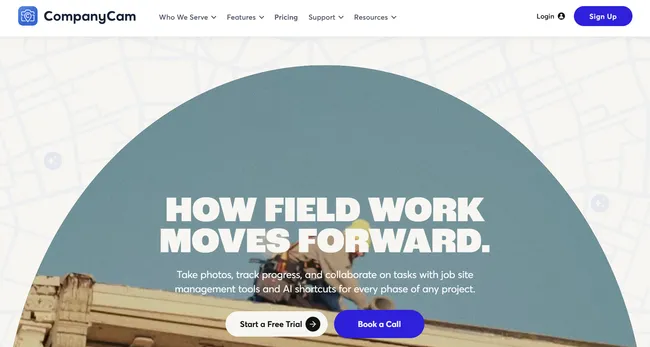
Documentation protects you legally, supports estimates for future projects, and keeps your team accountable.
Consistent documentation resolves disputes quickly and builds stronger referral businesses.
Useful tools:
- Google Drive or Dropbox – A free shared folder per project (e.g., “123 Main St – Kitchen Remodel”) with subfolders for photos, contracts, and selections.
- CompanyCam – Auto-organizes job site photos by location with timestamps. Use AI to add details to the photos with your voice.
- Your phone’s camera – Already timestamps and geolocates every photo. Over time, your archive becomes a resource you can analyze data from to improve future estimates.
Organizational strategies:
- Daily photo protocol – Crew leads take three to five end-of-day photos per site. Two minutes creates a visual timeline of the entire build.
- Pre-demo documentation – Photograph and video every surface before demo. Non-negotiable for remodeling. Protects you in disputes about pre-existing conditions, structural integrity, or local building codes.
- Pre-drywall photos – That way your team is never guessing what’s behind the wall. Less hassle if you need to cut into a wall without damaging what’s behind it, or need to install cabinets but can’t find blocking.
- Consistent file names – Use a date + address + description format.
How to Streamline Your Pre-Sale Process to Shorten Time From First Meeting to Signed Contract
The pre-sale phase is where most home renovation contractors lose more money than they realize.
Not because they price projects wrong, but because they spend too many hours on prospects who never sign.
These strategies help you tighten the planning process so you spend less time selling and more time building, with fewer surprises along the way.
The Pre-Commit Trap: Hours of Work, No Contract
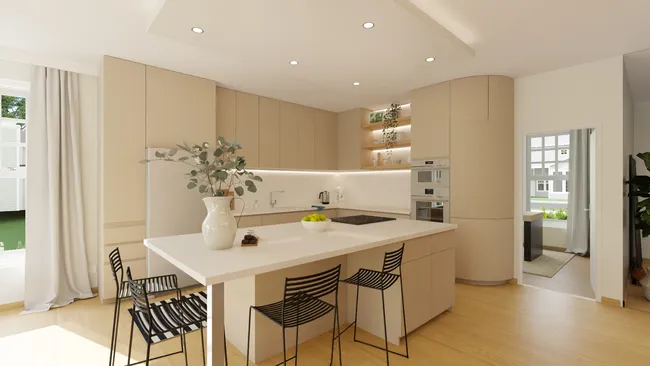
Here’s the scenario most general contractors know.
A homeowner calls about a kitchen remodel.
You drive out, take measurements, and promise an estimate.
Three or four hours later you send a line-item proposal.
A week later the client texts: “We’re going to hold off.”
A lot of builders spend 30 to 40 percent of their week on estimates for jobs they never land.
Breaking the cycle isn’t about working faster.
It’s about changing what you show the client and when.
And that’s because most clients at this stage aren’t comparing line items.
They’re trying to figure out which contractor understands what they want.
The cost of the pre-commit trap:
- Wasted trips to measure homes that never convert to signed contracts
- Unbilled design time creating layouts and estimates for uncommitted prospects
- Opportunity cost…every hour on a dead-end proposal is an hour not spent on a signed project or the next project in your pipeline
- Decision fatigue from context-switching between selling and building all day
That is where visuals change the game.
Visual First, Detail Later: Render to Commit, Refine After
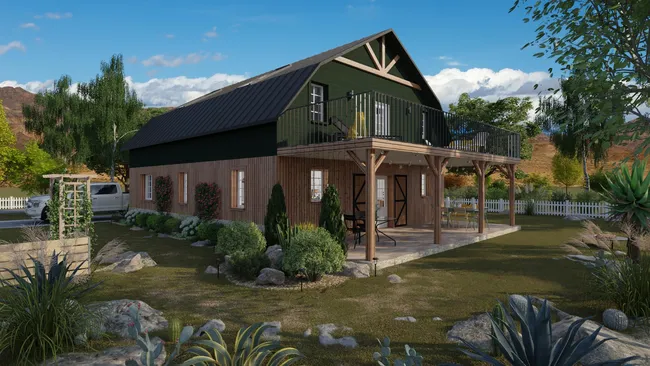
The fastest way to shorten the path from first meeting to signed contract is to flip the traditional proposal.
Instead of hours on a line-item estimate, lead with a visual and a ballpark price range.
A 3D rendering for contractors does something a spreadsheet never will: it makes the renovation feel real.
When a client sees their kitchen, they stop comparing you on price alone.
They see you as the contractor who understands their vision.
With tools like Cedreo, you can produce high-quality concept designs fast enough to make this workflow viable on every project.
How this approach saves time and wins more jobs:
- You invest 30 to 60 minutes on a visual concept and a price range instead of four-plus hours on a detailed proposal
- Clients self-select faster because the rendering answers the question: “Does this contractor understand what I want?”
- You set yourself apart from every other contractor who shows up with just a number and a list of line items
- The visual locks expectations early, so when you do nail down the exact budget later, there are fewer surprises
Cedreo Workflow: Same-Day Client-Ready Output
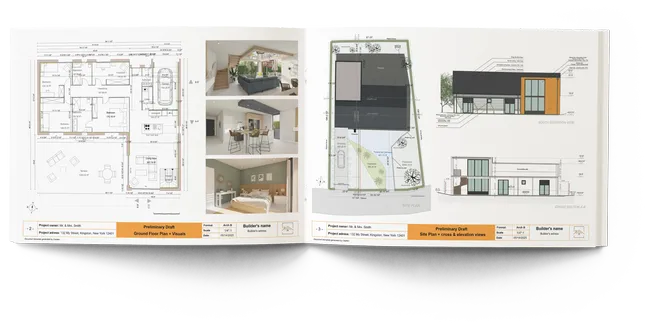
Cedreo makes the visual-first approach practical, even for contractors with zero CAD experience.
With Cedreo, you can go from a blank screen to a client-ready presentation in a single work session.
If you don’t have an account, create a free one now.
Here’s how you can create a 3D project presentation in 2 hours or less:
- Draw the floor plan. Import a blueprint as a background layer if you have one. Draw interior and exterior walls. As you draw, the 3D view updates automatically.
- Add wall openings. Place doors, windows, and sliding doors from the wall opening library. Customize as needed.
- Add furnishings and materials. Drag, drop and customize furnishing and decor. Apply finishes and materials to flooring and walls.
- Create the site and terrain. Position the building on the site and model the terrain so the elevation matches the finished grade.
- Generate 3D renderings. Set camera angles and lighting and generate photorealistic renderings. Each takes about five minutes.
- Build the presentation. Compile floor plans, elevation views, cross-sections, a site plan, renderings, and surface area tables into a branded project presentation. Export as PDF for easy sharing.
PRO TIP! Use Cedreo’s project duplication feature to create design variations for the same client. Duplicate the base project, make changes, and present two or three options side by side. It takes minutes and shows clients you’ve thought through the alternatives.
How to Organise the Design/Estimate Phase So It Stops Eating Your Time Before a Contract Is Signed
The design and estimate phase is one of the biggest time drains for contractors who haven’t built a repeatable process around it.
Here are three strategies to tighten it up.
Run Design and Estimate in Parallel, Not Sequence
Most contractors follow a linear process: design the project, then estimate it.
That means the estimate doesn’t start until the design is fully approved, which can take weeks of back-and-forth.
A faster approach is to run both streams at the same time.
While you are refining the floor plan in Cedreo, your estimator (or you, wearing your estimating hat) can be pulling material costs and subcontractor pricing based on the scope that is already defined.
The design doesn’t need to be final for the estimate to be 80 percent complete.
How to make parallel workflow practical:
- Lock the scope early – Define project boundaries in the first design session: square footage, wall moves, fixture quality. That’s enough to start estimating.
- Use a tiered estimate format – Present a ballpark price range tied to the conceptual design and 3D renderings. Refine to an exact budget once the client is on board.
- Combine the design and budget review – One meeting, not two. The client sees the renderings and rough cost together and can make informed decisions.
Pre-Qualify Before Designing: Budget Talk in Meeting One
The fastest way to stop wasting time on dead-end proposals is to have the budget conversation in the first meeting.
Not a vague “What’s your ballpark?” question.
A direct conversation about what a project like theirs typically costs in your market.
Most homeowners have no idea what a kitchen remodel or home renovation actually runs.
So give them a realistic range upfront: serious clients appreciate the transparency while window shoppers disappear early.
How to pre-qualify effectively:
- Share price ranges by type – Keep a reference sheet of typical costs for the remodeling work you handle. A bathroom gut-reno might run 25 to 50 thousand dollars.
- Ask about timeline and motivation – Clients with a specific event or deadline are more committed than those with none.
- Define your minimum project size – If your sweet spot is over a certain dollar amount, say so. Better to lose a small lead than waste a week on resources that won’t pay off.
Charge for Design to Filter Serious Clients Early

Charging for the initial design phase is one of the most effective ways to separate serious buyers from people who are just collecting free ideas.
A paid design session doesn’t have to be expensive.
Even a small fee ($500 to $1,500 depending on project size) signals to the client that your time and expertise have value.
Many contractors who charge for design close at a higher rate because the clients who pay are already emotionally invested in moving forward.
How to position a paid design phase:
- Credit it toward the project – Apply the fee to the total construction cost if the client signs. Removes the objection.
- Deliver a tangible product – Use Cedreo to deliver professional house plans and 3D renderings. The client walks away with something valuable.
- Frame it as a cost saving – The paid design phase helps prevent costly mistakes by getting the scope right before construction starts.
How Small Contractors Can Improve Construction Workflows Once the Project Is Signed
Since most small contractors don’t have a full office team to back them up, they end up wearing a lot of hats.
That can make it harder to manage even basic construction workflows.
These four strategies help you stay ahead of problems rather than reacting to them.
Pre-Construction: Materials and Subs Locked
The time between signing and demo isn’t downtime.
It’s your planning window.
Use it to lock materials and confirm sub schedules, and you prevent the most common source of significant delays: waiting on something that should have been ordered two weeks ago.
What to lock before work begins:
- Material selections confirmed – Order all finish materials (tile, flooring, countertops, fixtures) with confirmed lead times. Selecting materials during the construction process creates scheduling conflicts when items are backordered. Locking in the right materials early is how your team avoids downtime.
- Subcontractor schedules confirmed – Written confirmation from every sub with start dates and durations. Coordinating subcontractors upfront prevents one late trade from delaying the rest.
- Contingency plans documented – Identify likely unexpected challenges (hidden water damage, outdated wiring, asbestos) with allowance amounts and backup options. Good problem solving here protects long term durability and ensures quality.
PRO TIP! Create a pre-construction checklist template that you use for every project so you don’t miss anything. Include items like: permits pulled, materials ordered with delivery dates, subcontractor contracts signed, client selections finalized, safety protocols reviewed, dumpster scheduled, temporary utilities arranged, etc.
Scheduling Backwards From Completion
Most contractors schedule forward: demo first, then framing, then rough-ins, and hope it all fits within the promised timeline.
A better approach is to schedule backwards from completion.
Start with the client’s move-in date or event deadline, then work backwards through each phase.
How to schedule backwards:
- Set the hard deadline – Confirm the final completion date and mark it non-negotiable.
- Block inspection windows – Back-schedule final inspection, punch list, and cleaning. These always take longer than expected.
- Layer in trade phases – From the inspection date, back-schedule finish work, rough-ins, framing, and demo with realistic buffers.
- Identify the critical path – Highlight tasks with zero flexibility. If custom cabinets take eight weeks, that order date is fixed. Miss it and the overall project shifts.
Client Cadence: Weekly Updates Kill Reactive Calls
Nothing erodes a client relationship faster than silence.
And nothing eats up a contractor’s day faster than unplanned calls from worried homeowners.
The fix is simple: a scheduled weekly communication update.
Clients stop calling because they already know what is happening.
What a weekly update should include:
- What was completed this week – Two to three sentences and a few daily progress photos.
- What is happening next week – Which trades are coming, what milestones are targeted.
- Decisions needed – Any selections, approvals, or changes the client needs to make, with a clear deadline.
- Budget status – A quick summary of where the project stands financially against the original estimate. Transparency here builds trust and prevents end-of-project surprises.
Closeout: Punch List and Referral
The last five percent of a remodeling project often takes 20 percent of the time.
A sloppy closeout process damages your reputation and kills referrals.
A tight one turns every client into a marketing channel.
How to close out efficiently:
- Walk the project together – Schedule a formal walkthrough with the client to ensure quality on every detail. Use a punch list template.
- Set a completion window – Give your team a defined timeline to address all punch list items. Don’t let it drag on for months.
- Ask for the review at handover – The best time to ask is when the client is standing in their finished space and feeling great about it. Build the review ask into your closeout template and make it easy for the client to do.
- Send daily reports during punch list work – Maintain your communication standard through the finish line.
How Contractors Manage Multiple Job Sites Without Losing Control
Improving workflows and managing multiple jobsites comes down to…
- Standardizing communication
- Running on systems instead of memory
- Consistently using simple tools and organizational strategies
- And streamlining the design-estimate phase
Cedreo powers the most leveraged piece of that system: the pre-sale design phase.
- Create 3D home designs fast so you can present sooner
- Win contracts with client-ready visuals
- Set expectations with clear visuals
See firsthand how Cedreo helps contractors streamline their design workflows.
Sign up for a free account today!
General Contractor Workflow FAQs
How do general contractors streamline remodeling projects?
General contractors streamline remodeling projects by using digital tools for design, scheduling, and communication that reduce manual work and prevent delays.
Standardizing processes like client updates, material ordering, and subcontractor coordination saves time across every project.
What should a contractor organize before starting a remodeling project?
Before starting, contractors should lock in material selections, confirm subcontractor schedules, pull all necessary permits, and finalize the project scope with written client approval.
Having contingency plans for common unexpected challenges like hidden damage or supply delays also prevents costly disruptions.
How do you prevent scope creep on a remodeling project?
Scope creep is best prevented with a detailed scope document signed before work begins, combined with a visual sign-off on renderings or floor plans.
Cedreo helps contractors create clear visual references that lock expectations early, so changes require a formal change order instead of a casual conversation.
How do contractors manage multiple job sites at the same time?
Contractors manage multiple job sites by centralizing schedules in one tool, requiring daily progress photos from crew leads, and designating a point person at each site.
With these systems in place, general contractors can track progress across all their projects without being physically present at each one.
How can small home renovation contractors improve their construction workflows?
Small contractors can improve construction workflows by investing in a focused stack of tools for design, project management, and client communication rather than trying to do everything manually.
Even simple changes like weekly client updates and pre-construction checklists dramatically reduce delays and increase efficiency.
What tools do small contractors use to manage projects more efficiently?
Small contractors commonly use tools like Cedreo for design and client presentations, Buildertrend or Jobber for project management, and shared folders for site documentation.
The right combination depends on the size and type of projects, but focusing on simple tools that save time on recurring tasks delivers the biggest cost saving.
How do you shorten the time from first meeting to signed contract?
The fastest way is to lead with a visual concept (like a 3D rendering from Cedreo) instead of a detailed estimate.
You can also pre-qualify clients with budget conversations in meeting one and charge for the design phase to filter serious buyers and improve your close rate.