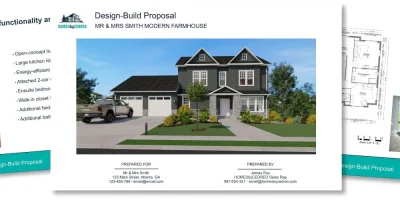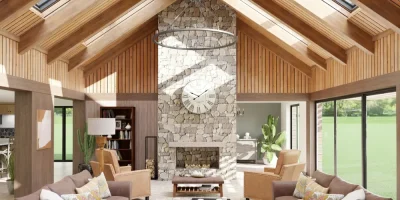
Landing more projects starts with floor plan presentations that help clients see the finished home.
A great floor plan presentation can be the difference between a signed contract and a lost project.
The problem?
Most clients struggle to read 2D plans on their own.
They stare at lines and dimensions without truly understanding what the finished space will look or feel like.
And for contractors, builders and remodelers, pulling together a polished presentation often takes far too long.
That means hours spent on design prep instead of actually selling projects.
So this article explores the different types of preliminary floor plans used in presentations, why they matter, and how to present them in a way that helps clients visualize every detail of their future home.
Key Takeaways
- A floor plan presentation is a structured package of plans with project details presented to clients to communicate your design vision.
- There are several types of preliminary house plans you can include, from 2D floor plans and site plans to elevation views and cross sections.
- How you present your floor plans matters just as much as the plans themselves. A clear, well-organized presentation builds confidence and reduces revision rounds.
- Cedreo helps contractors, builders and remodelers create complete floor plan presentations in a fraction of the time, so you can spend less time designing and more time closing deals.
Why trust us? Here at Cedreo, we’ve got 20+ years of experience working with housing pros in the home design space. So we know what it takes for builders and contractors to create floor plan presentations that help them land more clients!
See How You Can Create Complete Projects with Cedreo
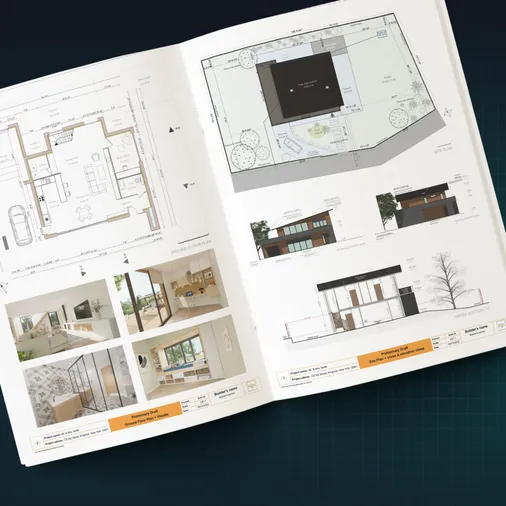
Plans – Get site plans, 2D floor plans, electrical plans, cross sections and elevation views — with all the technical details you need for a comprehensive project overview.
3D Visualizations – Use interior and exterior 3D renderings as well as 3D floor plans to help clients understand the finished project.
Documentation – Manage all your visual documents in one place, so it’s easier to present and sell your projects.
No credit card required, no commitment
What is a floor plan presentation?
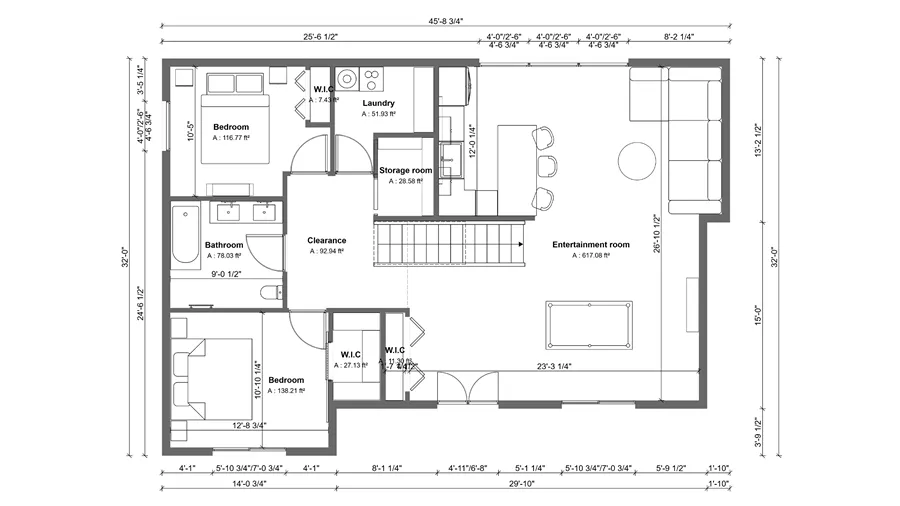
A floor plan presentation is a structured collection of architectural drawings, renderings, and project details that you present to a client to communicate your design vision.
At its simplest, it is you showing the client their floor plans.
But today, a strong floor plan presentation goes well beyond a single 2D drawing.
It typically includes…
- Multiple types of plans (house plans, site plans, terrain plans, elevations, etc.)
- 3D renderings
- Surface area tables
- Material selections
- All packaged into one cohesive document.
The goal is to give clients a complete picture of the project scope so they can make confident decisions.
By definition, it is the complete package you use to communicate your design ideas and get client buy-in before moving forward.
Think of it as the bridge between what’s in your head and what the client needs to see before they sign off.
Technology has made this process much faster.
With floor plan software like Cedreo, you can create detailed, professional plan presentations in 2 hours instead of days.
What Is a Preliminary Floor Plan?
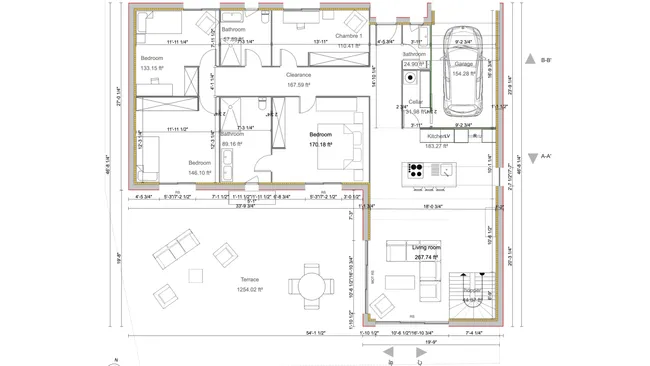
A preliminary floor plan is the initial version of a floor plan created early in the design process.
It captures the basic layout, room placement, and overall dimensions before the project moves into more detail.
Preliminary floor plans are not final construction documents.
They are working drafts meant to align the builder and client on direction, room sizes, and spatial flow.
Once the client approves the preliminary plans, you refine them with more detail, including materials, electrical placement, and precise dimensions for bedrooms, bathrooms, and every other space.
From what we’ve seen working with contractors and builders, the preliminary floor plan stage is where most important design decisions happen, so getting it right matters.
Why Are Good Floor Plan Presentations Important?
Your floor plan presentation can make or break the whole project.
That is because it communicates critical information to clients at the exact moment they decide whether to move forward.
One thing we’ve noticed from builders we work with is that clients who do not fully understand the design are far more likely to stall, request endless revisions, or walk away entirely.
A good presentation solves that.
Here’s how.
Floor Plan Presentations Make Technical Plans Easy for Clients to Understand
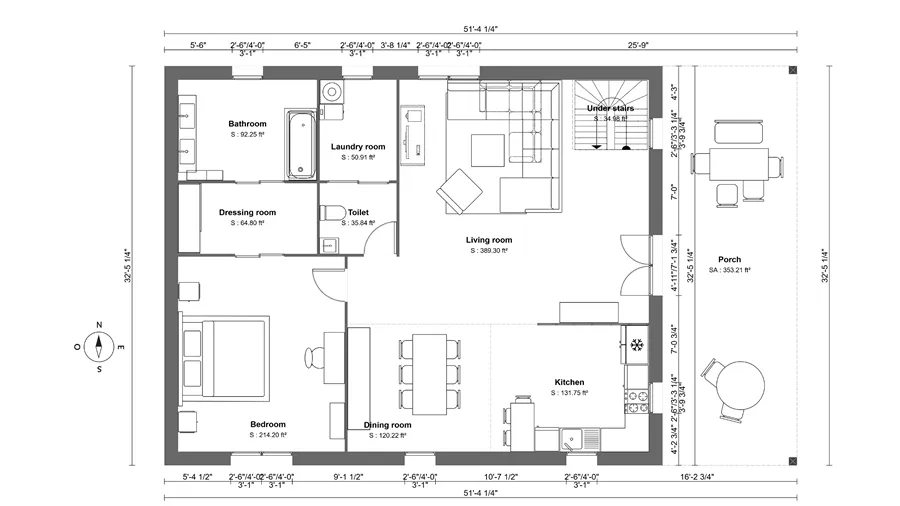
Most homeowners are not familiar with architectural drawings.
They see lines, dimensions, and symbols without truly grasping how the space will feel when built.
A good floor plan presentation bridges that gap by layering 2D floor plans with 3D views, and material details that make the design immediately clear.
When clients can actually visualize the finished project, decisions happen faster.
Complete Preliminary House Plans Build Client Confidence and Win More Projects
If your presentation is confusing, incomplete, or hard to follow, clients lose confidence in your capabilities.
They start second-guessing the design, asking for more meetings, and comparing you to competitors who presented more clearly.
A polished, well-organized presentation does the opposite.
It shows clients you are thorough, professional, and in control of the project.
In 20+ years working with housing pros, we’ve seen first hand how contractors and builders who invest in polished presentations close at significantly higher rates.
The Right Tools Save You Time While Creating Your Floor Plan Presentation Board
A good presentation does not have to take days to put together.
Modern floor plan software like Cedreo cuts the process down dramatically, so you can deliver a complete, professional presentation without burning through your schedule.
That means less time drawing floor plans, creating renderings, and formatting documents, and more time actually selling the next project.
Here’s what a Cedreo user said:
“Easy to learn. I’ve only been using it for a few hours and I have a presentation for my client.”
Robin K. – Construction Professional
A Complete House Plan Presentation Communicates Accurate Dimensions for Construction
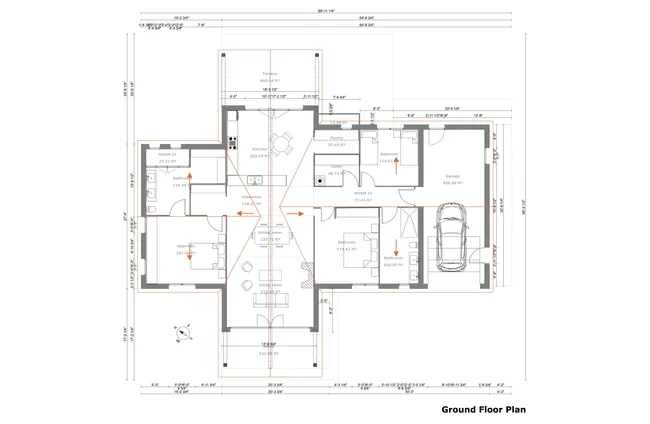
2D floor plans with dimensions are an important part of any floor plan presentation.
You can communicate detailed information about the dimensions of every room and space in the project.
This is useful for both the client and any contractors who might be involved in the construction.
Detailed Floor Plan Presentations Show Placement of Utility Systems and Furniture
The level of detail you include in a plan presentation is up to you, but more detail is often better.
Easy-to-use floor plan software has made it simple to include everything from the placement of utility systems like plumbing and electrical to the possible placement of furniture in the completed structure.
Clients appreciate seeing where appliances, fixtures, and furnishings will go because it helps them picture daily life in the space.
Presentations with 3D Floor Plans Help Clients Visualize the Finished Project
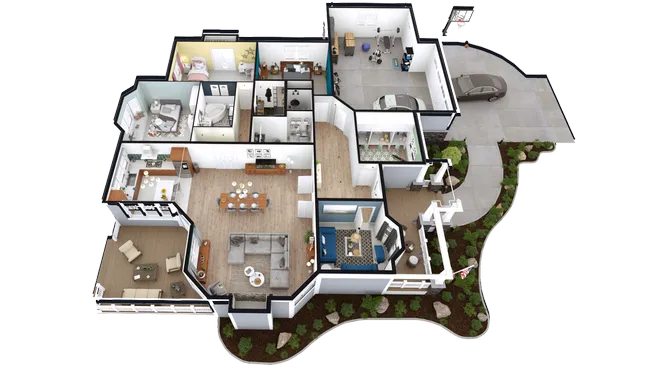
All that detail in your floor plan presentation has an extremely important effect on the client: it helps them visualize the finished project.
With a properly executed presentation, you bring flat floor plans and 3D floor plans to life in the client’s mind.
That creates an emotional connection to their dream home and eliminates confusion about the project scope.
A Comprehensive Architectural Floor Plan Presentation Lets You Collect and Act on Feedback in Real Time
You are presenting your floor plans to the client for approval, but a big part of that process involves getting feedback.
Presentations provide a formal meeting at which clients can deliver feedback on the work you have done.
And if you’re using the right floor plan software, you can quickly make changes in real time so clients see updates on the spot.
Preliminary Floor Plans Double as a Powerful Sales Tool
“Show, do not tell” applies as strongly to selling home building, remodeling, or architecture services as it does to selling anything else in the building services industry.
But how do you show what you can do?
With a 3D floor plan presentation.
Show prospective clients what you can do for them with detailed examples of floor plans you can create.
When presented well, even a simple presentation plan can become a powerful closing tool.
Types of Preliminary House Plans
Presentations are an important part of the home building and design process, and there are a variety of types of floor plans you can include.
Here are the most common types of floor plans that you should include in a complete presentation.
2D Floor Plans
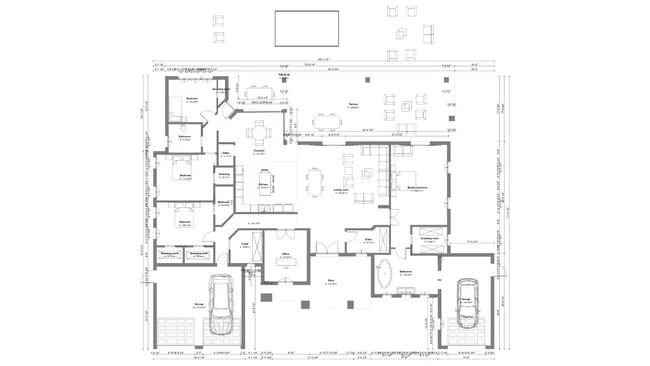
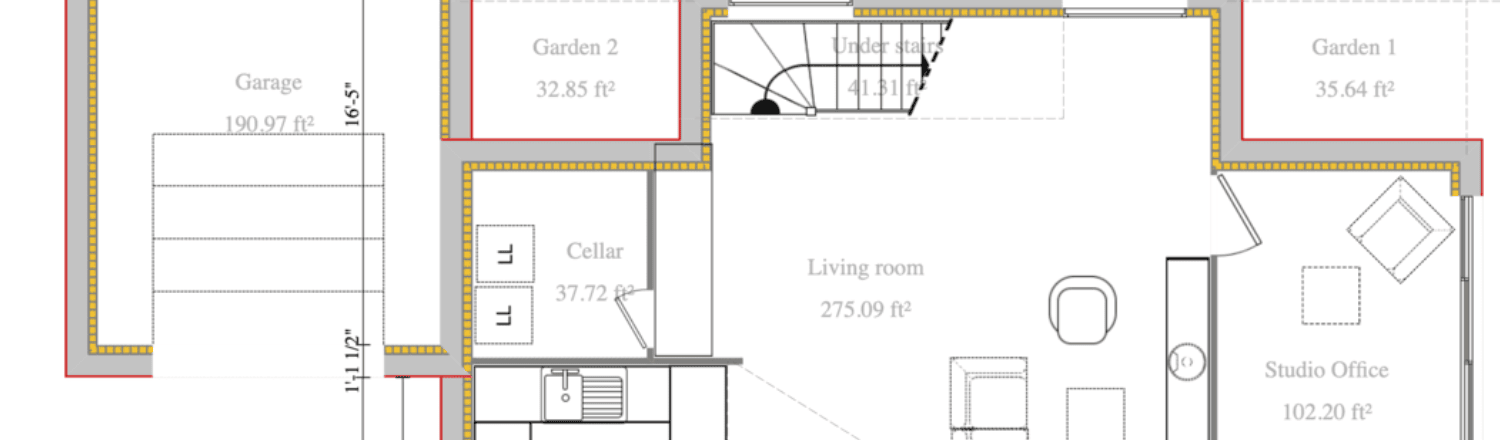
A 2D floor plan is a top-down drawing that shows the layout of rooms, walls, doors, and windows on a single level of the building.
They can also include symbols for furniture and fixtures.
Two-dimensional floor plans may look more familiar to your clients than most other types of plans.
That is because we are all accustomed to seeing this flat, bird’s-eye view of buildings.
For your floor plan presentation, 2D plans give clients a quick and easy way to check room dimensions, spatial flow, and overall layout proportions.
How 2D floor plans contribute to your presentation:
- Communicate room sizes, wall thickness, and dimensions at a glance
- Provide a clear overview of the floor layout that is easy for clients to follow
- Show door and window placement for each level of the building
- Serve as the foundation that all other plan types build on
3D Floor Plans
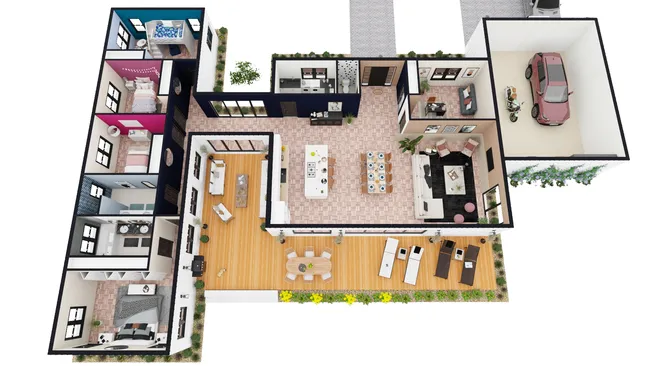
A 3D floor plan is a furnished, three-dimensional view of the layout that shows walls, flooring, furniture, and decor from an elevated angle.
The addition of a 3D floor plan to your presentation brings with it a level of detail that you simply cannot communicate in 2D.
The picture suddenly looks real to life, including the specific wall and floor coverings, the textures, the decorations, and the colors.
3D floor plans are still shown from above, but they provide an isometric view that showcases interior walls and details not visible in 2D.
How 3D floor plans contribute to your presentation:
- Help clients visualize the actual look and feel of each space
- Show furniture placement, materials, and color choices in context
- Clear up any confusion left from the 2D plans
- Create a stronger emotional connection to the design
Elevation Plans
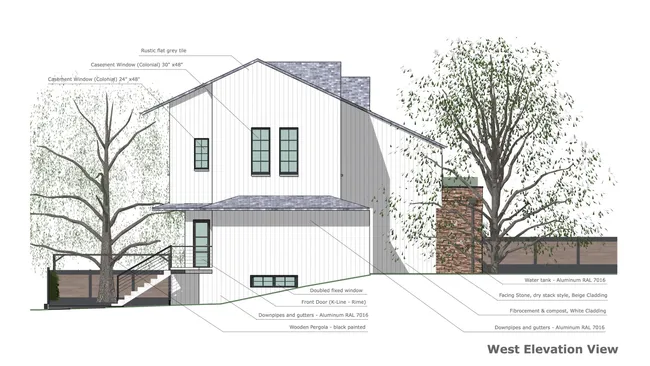
An elevation plan is a flat, front-facing drawing of the exterior of a building as seen from one side.
Elevations show the height of the structure, roof lines, window and door placement, and exterior materials.
They give clients a realistic sense of what the finished home will look like from the outside without the distortion of a 3D perspective.
How elevation plans contribute to your presentation:
- Show the exterior design from each side of the building
- Help clients compare different facade treatments
- Provide a clear reference for exterior proportions
Cross-Section Plans
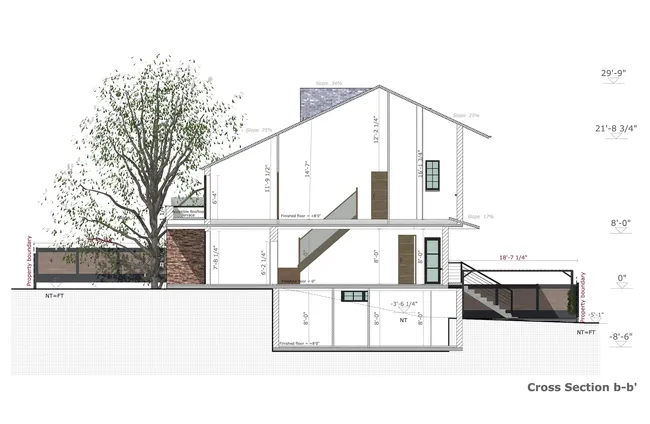
A cross-section plan is a vertical cut through the building that reveals the internal structure, ceiling heights, and floor levels.
Cross sections show how the building is layered from ground plane to roofline.
They are especially useful for projects with multiple stories, or complex rooflines where clients need to understand the depth of the space.
How cross sections contribute to your presentation:
- Show the relationship between different levels of the building
- Help clients understand spaces that are hard to convey in plan view
Site Plans
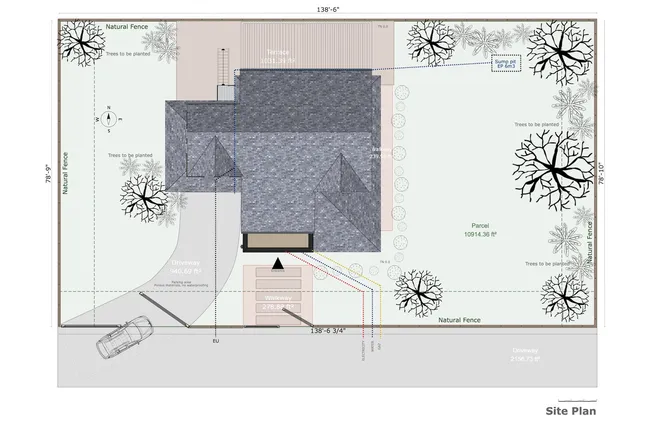
A site plan is a top-down drawing that shows the building footprint on the entire property, including driveways, walkways, landscaping, and other exterior structures.
Your floor plan presentation doesn’t have to be limited to the home itself.
It can and should include every structure on the property to give clients the full picture of the work you plan to do.
Site plans are especially important for new construction where building placement, setbacks, and lot coverage are key decisions.
How site plans contribute to your presentation:
- Show the building location relative to lot boundaries and property lines
- Help clients understand the overall scope of the project on the property
- Provide context for landscape and exterior design decisions
Landscape Plans
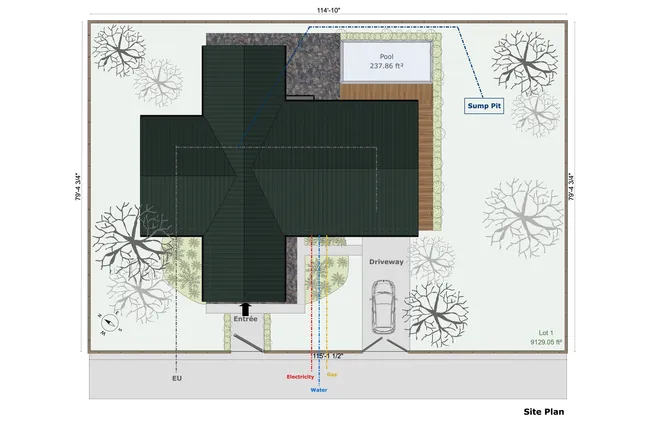
A landscape plan is a detailed drawing of the outdoor spaces around the home, including plants, trees, pathways, fences, pools, and outdoor living areas.
Landscaping is a critically important consideration for many home buyers.
The landscape is, after all, the canvas on which you will build the home your clients are hoping for.
In 2D or 3D, a landscape plan communicates not only the outdoor features but also the elevation, terrain, plant life, exterior spaces, and much more.
How landscape plans contribute to your presentation:
- Show the full outdoor living experience including patios, decks, and gardens
- Help clients visualize exterior spaces before construction begins
- Communicate planting plans, walkway materials, and outdoor furniture placement
- Tie the home design into its surrounding environment
Electrical Plans
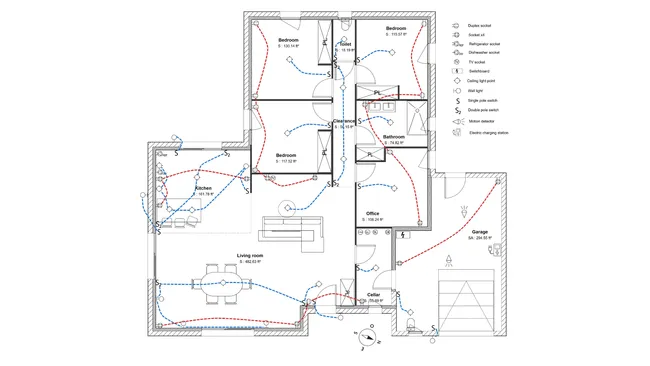
An electrical plan is a floor plan overlaid with electrical symbols that show the placement of outlets, switches, light fixtures, and electrical panels throughout the home.
Electrical plans are a practical addition to your floor plan presentation because they address questions clients often have about installation and convenience.
Where will the outlets go in the kitchen?
How many light switches will be in the hallway?
Including an electrical plan in your presentation shows attention to detail and saves time by getting client approval on placement before construction begins.
How electrical plans contribute to your presentation:
- Show outlet, switch, and fixture placement for every room
- Help clients confirm electrical layout matches their lifestyle
- Reduce change orders by addressing electrical decisions early
- Demonstrate thoroughness that builds client trust
How to Present a Floor Plan to Your Clients with Cedreo
Here is a step-by-step guide to building a complete floor plan presentation using Cedreo.
Each step builds on the previous one, so by the end you have everything you need to walk into a client meeting with a professional, presentation-ready package.
Want to learn how to draw floor plans faster? Check out our guide on How to Draw Floor Plans.
Step 1: Draw Your Floor Plan in Cedreo
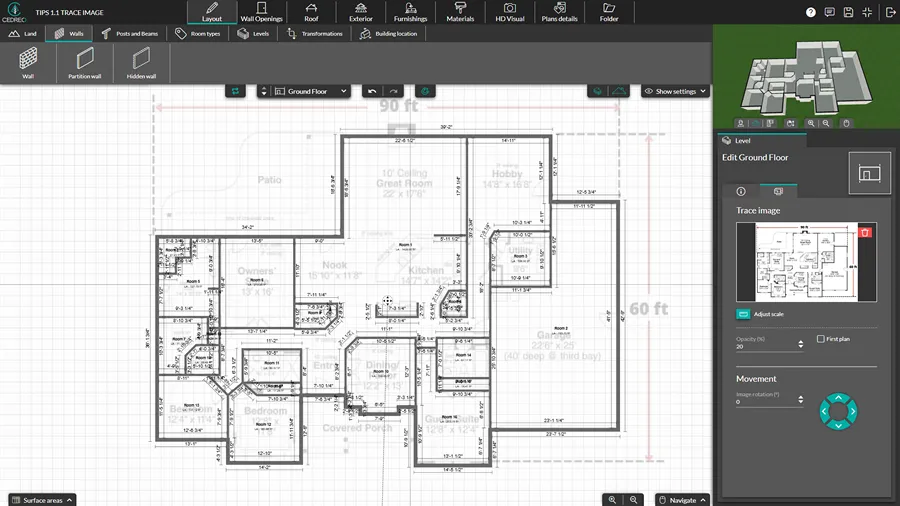
Start by creating your 2D floor plan in Cedreo.
Use the intuitive drawing tools to place walls, doors, windows, and staircases.
You can also import existing blueprints as a background layer and trace over them to speed up the process.
Cedreo automatically generates a 3D model from your 2D floor plan as you draw, so you can see the space take shape in real time.
Step 2: Add Multiple Floors and Define the Layout
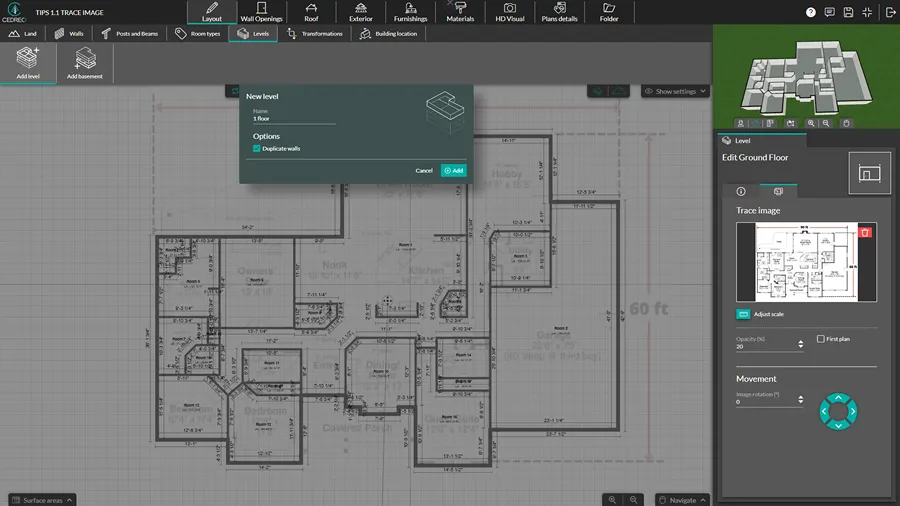
If the project includes multiple stories, add additional levels in Cedreo.
The software supports basements, main floors, and upper stories.
Define room sizes, hallway widths, and the overall spatial flow across every floor of the building.
This is the stage where you lock in the layout before moving on to design details.
Step 3: Design the Roof
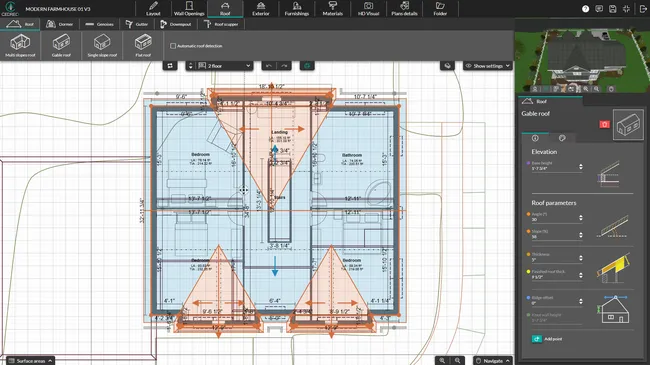
Choose from multiple roof styles including gable, hip, shed, flat, and mansard using Cedreo’s roof design tools.
Customize the pitch, add dormers or skylights, and select roof materials.
Cedreo can automatically generate a basic roof design from the floor plan shape, which saves significant time.
Step 4: Finish the Interior and Exterior Design
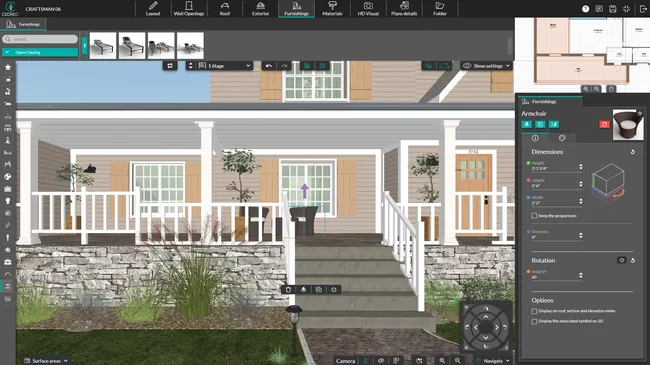
With the structure in place, add materials, finishes, and furnishings.
Quickly test different exterior treatments: siding, stone, stucco, and more.
For the interior, use Cedreo’s library of 10,000+ 3D furnishings, decor, and surface materials to furnish every room and validate proportions.
This step also includes adding lighting and choosing surface textures for walls, floors, and countertops.
Step 5: Model the Terrain and Landscape
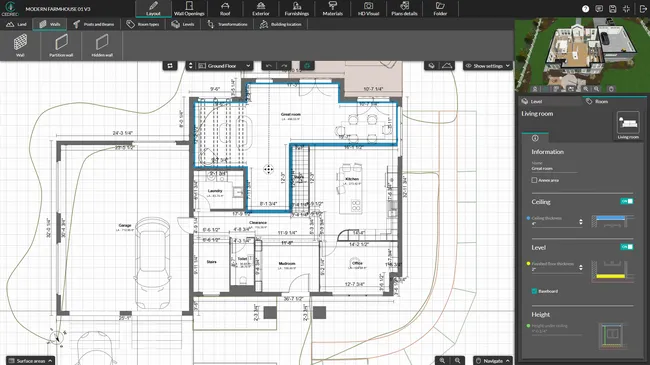
For new construction projects, use Cedreo’s terrain modeling tools to define the lot shape, elevation changes, and ground surfaces.
In the Layout tab, use the Building Location tool to adjust the position of the house on the site or to change its elevation.
Then add landscaping elements like trees, shrubs, pathways, fences, pools, and outdoor furniture.
A detailed site plan and landscape plan give your presentation the complete picture that clients expect.
Step 6: Generate 3D Renderings
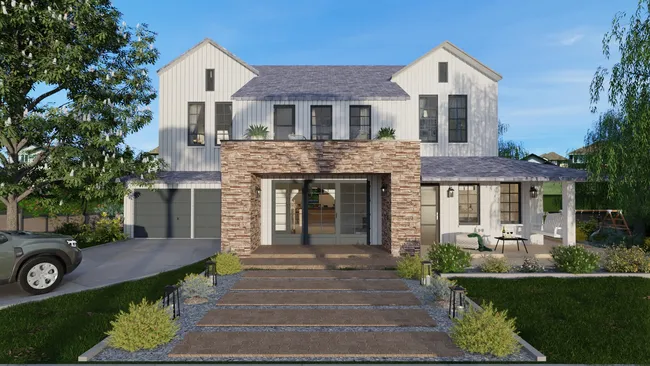
Generate photorealistic interior and exterior 3D renderings in about 5 minutes.
Adjust…
- Camera angles
- Lighting conditions (day or night)
- Sun orientation for realistic shadows.
These renderings are what turn your technical floor plans into visuals that actually sell the project.
Step 7: Produce Plans, Elevations, and Cross Sections
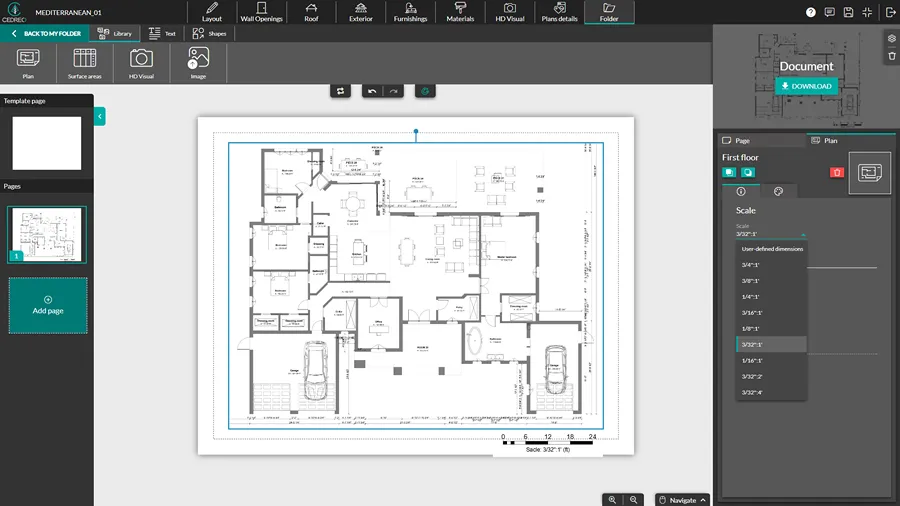
Cedreo automatically generates the technical plans your presentation needs: site plans, floor plans for each level, elevation views, and cross sections.
All drawings come from the same model, so every document stays consistent.
You can also add custom dimensions and annotations to provide clarity for your clients.
Step 8: Compile Everything into a Presentation
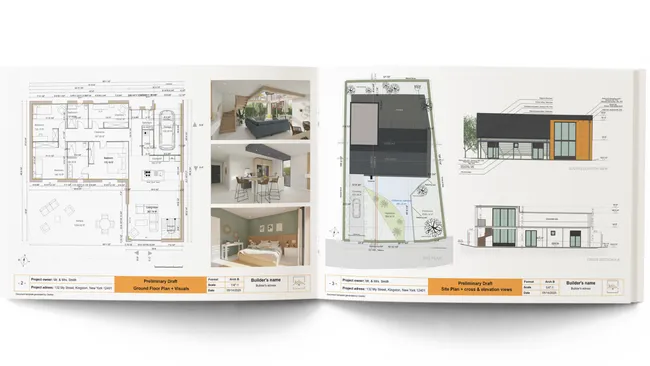
Pull everything together into one professional project presentation document using Cedreo’s built-in presentation tool.
- Structure the document so clients can follow the design from concept to detail.
- Add your company logo and branding for a polished, consistent look.
- Export as a PDF and you are ready to present.
PRO TIP! From what we have seen work for contractors, the most successful presentations follow a logical flow that tells a story. Start with the big picture (site plan), move to the layout (floor plans), then bring it to life (renderings). This keeps clients engaged and reduces confusion.
Tips for a Successful Architectural Floor Plan Presentation
Walking a client through your floor plan presentation is a skill that’s just as important as the plans themselves.
Here are some practical tips to make your architectural floor plan presentation more effective:
- Keep it simple for non-technical clients: Not everyone can read architectural drawings, so use 3D floor plans and renderings alongside your 2D plans to make the design immediately clear.
- Highlight what matters most to the client: If your client mentioned they want a spacious kitchen or a master suite with natural light, make sure those spaces get extra attention in the presentation.
- Invite feedback at each stage: Don’t wait until the end to ask for input. Pause after each major section and ask if the client has questions or concerns.
- Use the meeting as a selling moment: Presentations aren’t just for information, they are your pitch for your services. The quality of your floor plan presentation board reflects directly on your professionalism.
- Show before-and-after comparisons: For remodeling projects, presenting the existing floor plans alongside the proposed new design helps clients see the value of the changes.
- Be ready to make changes on the spot: If you use software like Cedreo, you can adjust floor plans during the meeting and show clients updated renderings in minutes, which shortens the feedback loop significantly.
PRO TIP! For more guidance on creating client presentations, check out this related article: Architecture Presentation Boards.
Create Professional Floor Plan Presentations in Less Time
Floor plan presentations are an essential tool for any home builder, remodeler, or contractor who wants to close more projects.
They serve both a critical client communication function and a revenue-boosting sales function when presented correctly.
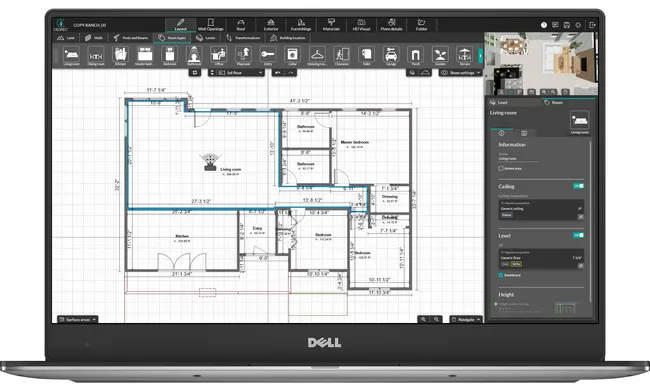
Now, modern software like Cedreo makes the floor plan presentation process quick and easy, with no background knowledge in CAD required.
Get all of this in less than 2 hours with Cedreo:
- Import and resize existing floor plans
- Scale floor plan drawing capabilities
- Instant 3D visualizations of 2D drawings
- Customizable doors, windows, and building products
- Duplicate and reuse floor plan designs
- A library of 10,000+ 3D furniture and decorations
- Customizable surface textures and coverings
- Photorealistic renderings with HD detail
With Cedreo you get less stress, more sales.
Floor Plan Presentation FAQs
What should be included in a floor plan presentation?
A complete floor plan presentation typically includes 2D floor plans, 3D floor plans, site plans, elevation views, cross sections, renderings, and surface area tables.
Cedreo lets you compile all of these into one professional presentation document in a fraction of the time of traditional software.
What is the difference between preliminary plans and construction drawings?
Preliminary floor plans are initial design drafts used to align the builder and client on layout, room sizes, and overall direction.
Construction drawings contain the detailed structural, mechanical, and technical specifications needed for building.
How do you create a floor plan presentation?
Start by drawing your floor plans, then add 3D renderings, site plans, and design details.
With Cedreo, you can create all of these elements in one platform and combine them into a single presentation document.
What types of plans are included in a house plan presentation?
A house plan presentation can include 2D floor plans, 3D floor plans, site plans, landscape plans, electrical plans, elevation plans, and cross-section plans.
Cedreo allows you to create all of these plan types in one place.
What makes a good floor plan presentation?
A good floor plan presentation tells a clear story from site plan to finished design, using a mix of 2D plans, 3D views, and renderings.
Cedreo helps you build presentations that are both detailed and easy for clients to follow.
What software is used to present floor plans?
Several software tools can be used for floor plan presentations, but Cedreo is designed specifically for busy contractors and home builders..
Use it to create plans, renderings, and presentations quickly without a CAD background.
How do you lay out an architectural presentation board?
Start with a site plan or exterior rendering, then organize floor plans by level, followed by elevations, 3D renderings, and material selections.
Cedreo’s built-in presentation tool lets you structure and export everything as a professional PDF.